Support ticketing for
Umbraco agencies
Install the Lantern NuGet package, paste your client’s embed key, and a floating ticket button appears on the frontend — visible only to logged-in Umbraco backoffice users, invisible to everyone else.
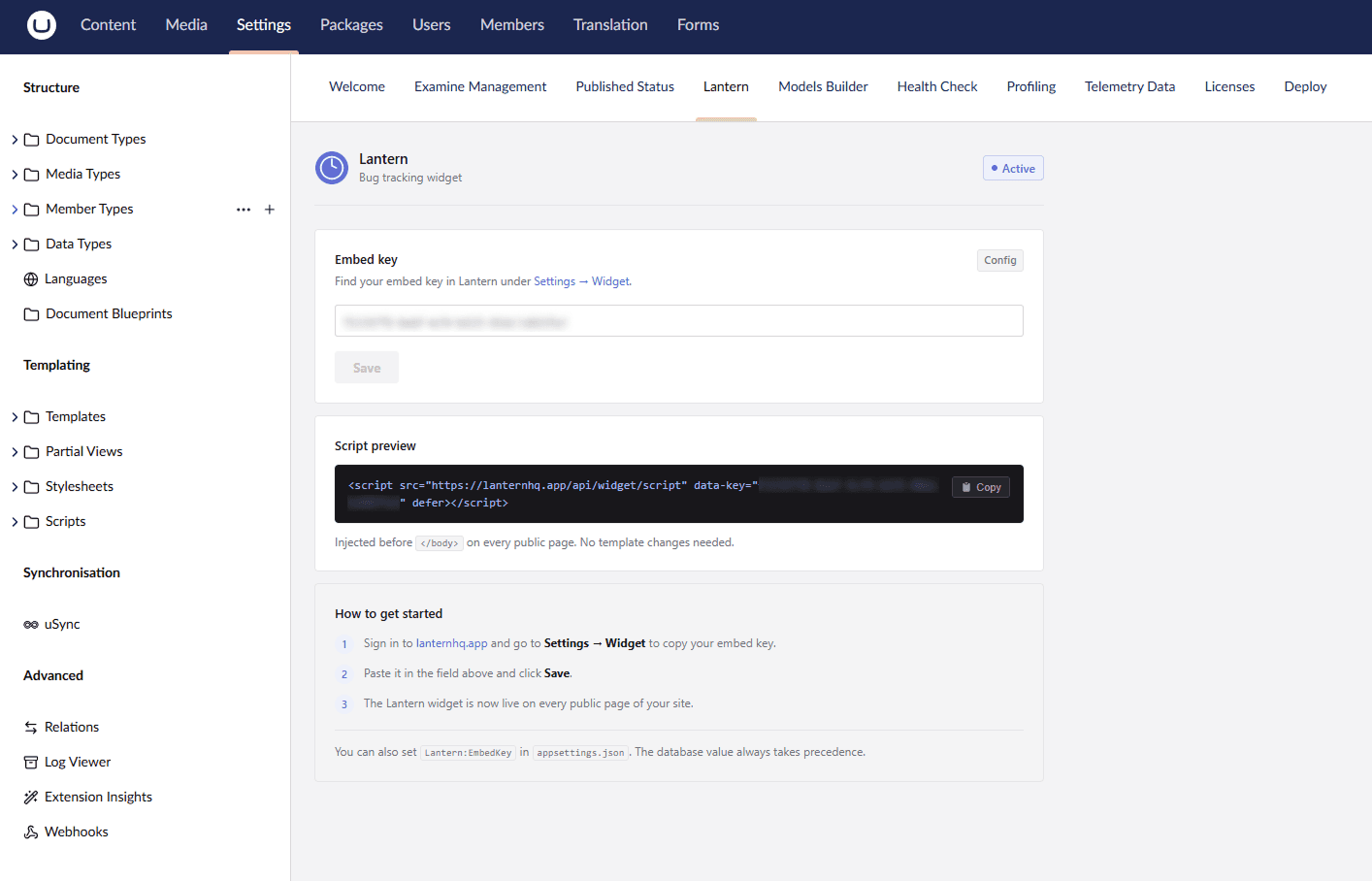
The widget appears on the frontend — only for logged-in Umbraco backoffice users
Stop chasing vague emails from Umbraco clients
You build the site. You hand it over. Then the emails start. “Something doesn’t look right.” “A form isn’t working.” Vague, context-free, and impossible to reproduce without five follow-up messages.
Set up in under 5 minutes
One NuGet package. One config key. Done.
Install the NuGet package
Add the Lantern package to your Umbraco v17 / .NET 10 project with a single command.
dotnet add package Lantern.Umbraco
Paste the client embed key
Go to your client's page in the Lantern dashboard and copy their embed key. Add it to appsettings.json — one line, one key per site.
{
  "Lantern": {
    "EmbedKey": "your-client-embed-key-here"
  }
}The widget appears — only for backoffice users
A floating ticket button appears on the frontend, but only for logged-in Umbraco backoffice users. Regular visitors see nothing. No feature flags, no conditionals, no maintenance mode toggle.
Available on
Invisible to visitors.
Always on for editors.
The widget checks for Umbraco’s backoffice session cookies —UMB_PREVIEW(set when an editor opens the frontend via Umbraco’s preview function) andUMB-BACKOFFICE(set when an editor has the backoffice open in another tab). If neither is present, the widget doesn’t render at all.
Install once and leave it running. Clients and editors can report issues whenever they’re on the site. Everyone else sees the site exactly as it is.
What the widget looks like
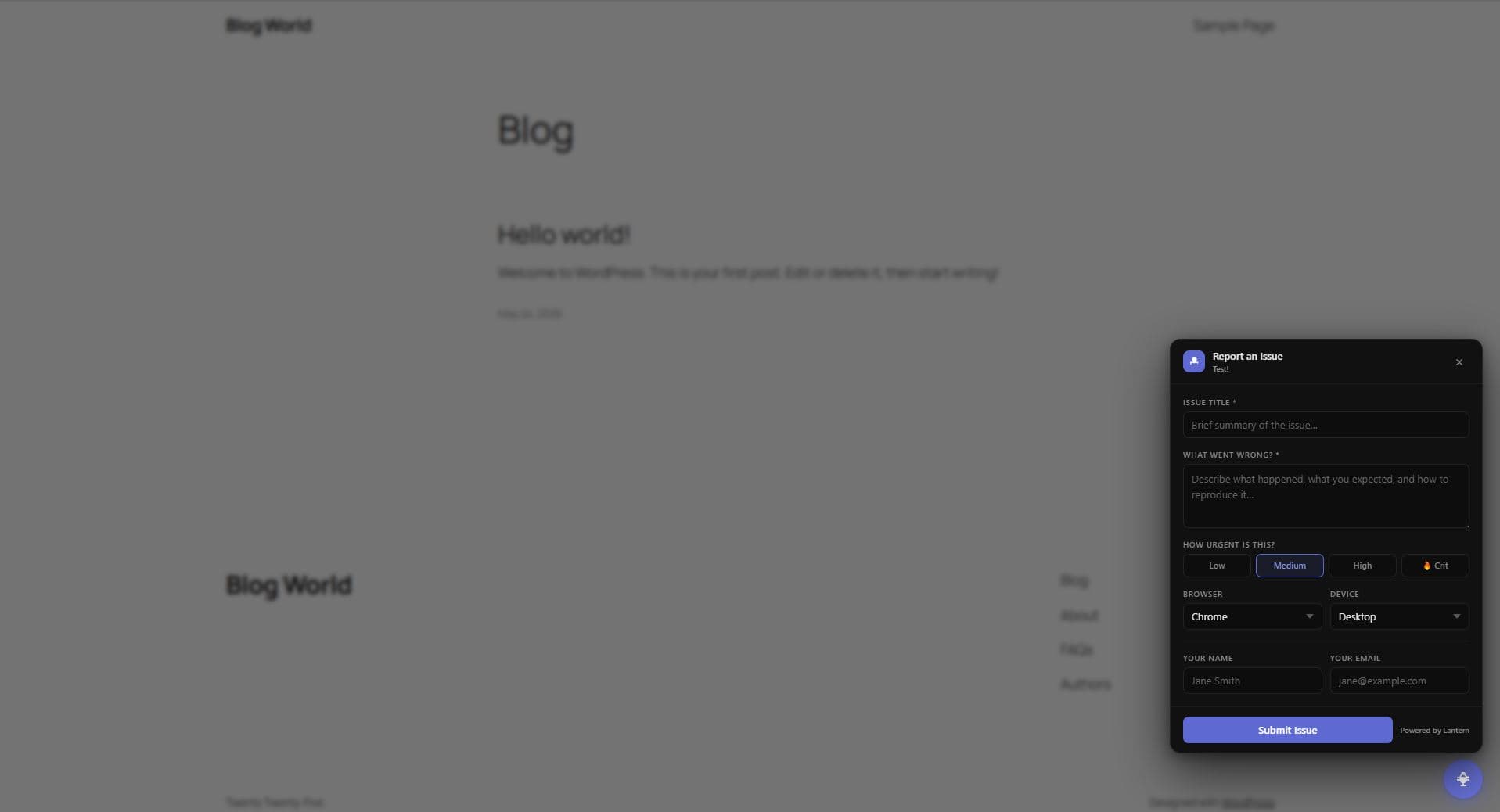
A small floating button in the corner. Click it, describe the issue, submit. Tickets land straight in your Lantern dashboard.
Trusted by 10 agencies and freelancers who've already moved their client feedback off email and Slack.
Simple, transparent pricing
14-day free trial on Individual. No credit card required.
Individual
For freelancers and solo developers
- 5 clients
- Unlimited issues
- Loom video integration
- Email & in-app notifications
- Internal notes
- Mentions & assignments
- Client self-service portals
Replaces:
- • Email threads (free but chaos)
- • Trello cards
- • Loom subscription
No credit card required
Team
For agencies with multiple team members
- Unlimited clients
- Unlimited issues
- Unlimited team members
- Everything in Individual
- Priority support
Saves your team:
- • 5 hours/week clarifying bug reports
- • 3 hours/week in status meetings
- • Countless back-and-forth messages
14-day money-back guarantee
Frequently asked questions
Which versions of Umbraco does the package support?▼
The package targets Umbraco v17 on .NET 10. If you need support for an earlier version, get in touch at hello@lanternhq.app.
Will visitors see the widget?▼
No. The widget checks for the UMB_PREVIEW and UMB-BACKOFFICE cookies, which are only set for authenticated backoffice users. If neither cookie is present, the widget renders nothing — not a collapsed button, nothing at all.
Can I use this across multiple Umbraco client sites?▼
Yes. Each client in your Lantern dashboard has their own embed key. Install the package on each Umbraco site with the corresponding key and tickets route to the right client automatically.
What details does the widget capture?▼
Title, description, urgency, browser (auto-detected), device (auto-detected), the URL of the page where the issue occurred, and optional name and email. Everything your dev needs to reproduce and fix it.
Does this replace the Lantern client portal?▼
It's complementary. The portal link works great for clients who prefer to submit a ticket from a separate tab. The embedded widget is there when a client is already on the site and notices something wrong — no context-switching needed.
Can I connect tickets to Jira?▼
Yes. Lantern integrates with Jira. When a client submits a ticket through the widget, it can automatically create a Jira ticket in the right project. Your dev team works in Jira; the client never needs to see it.
Add support ticketing to every Umbraco site you build
One NuGet package. One config key. Clients submit tickets in context. Free 14-day trial, no card needed.
From the blog
Umbraco Bug Tracking: Add a Client Reporting Widget with the Lantern Package
How the backoffice-only widget gate works and how to set it up in under five minutes.
The Best Bug Tracking Tools for Umbraco Agencies in 2026
Why generic tools fall short — and which options are actually built for Umbraco workflows.