A floating support ticket button
inside every client’s WordPress admin
Install the Lantern plugin, paste one embed key from your dashboard, and your client has a floating ticket button right inside their WordPress admin. They click it when they spot something wrong. The ticket lands in Lantern. Visitors never see a thing.
No credit card required · Free 14-day trial
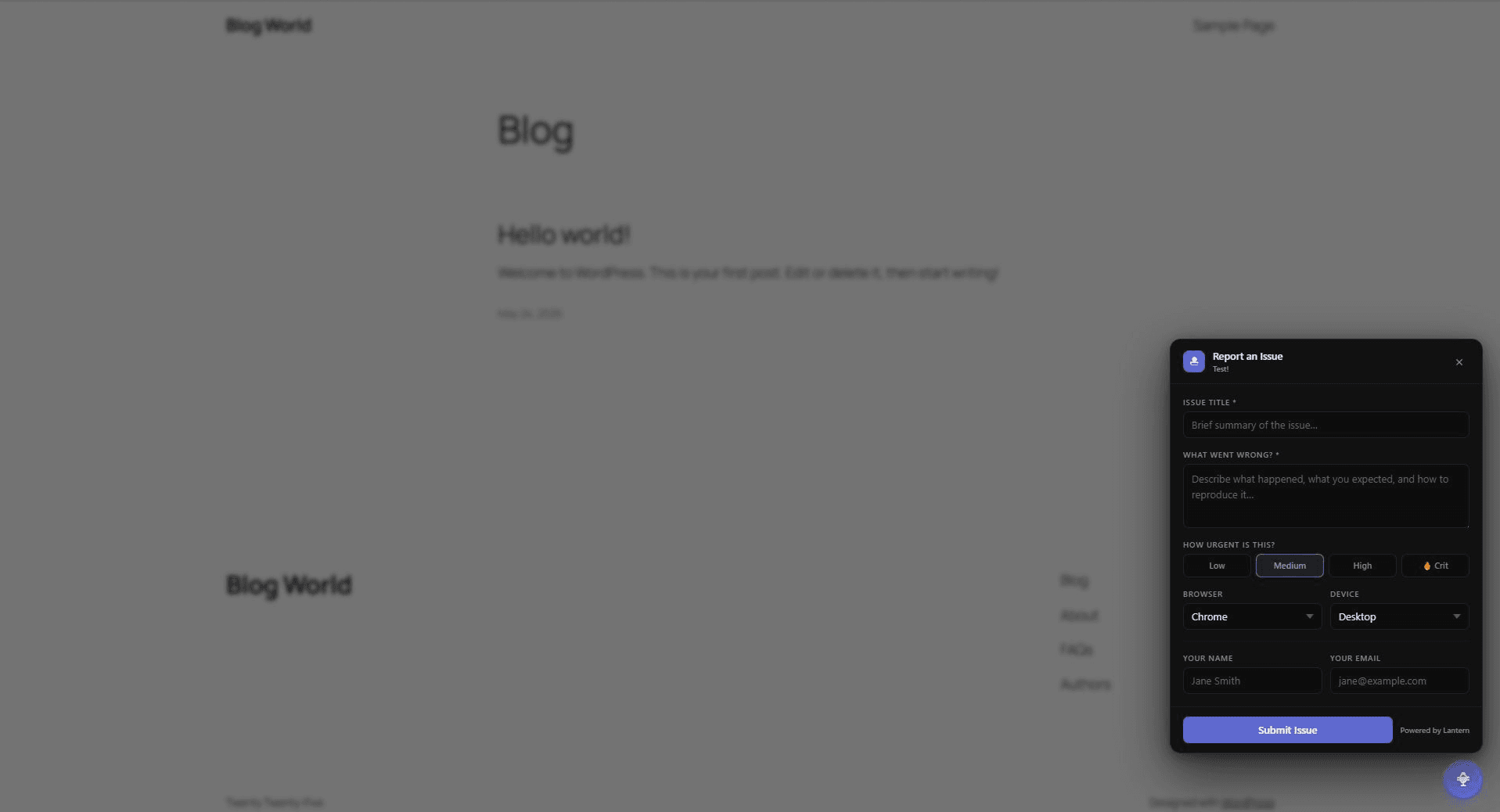
The widget appears in the corner — only for logged-in WordPress admin users
Stop chasing vague emails from WordPress clients
“Something’s broken on the homepage.” No browser. No screenshot. No steps to reproduce. Just an email and the start of a long back-and-forth.
Set up in under 2 minutes
Install the plugin, paste a key, done. No theme editing. No code.
Install Lantern from the WordPress plugin directory
Search "Lantern" in wp-admin → Plugins → Add New, or install directly from the WordPress plugin directory. Activate it. Takes under a minute — no theme editing, no code.
Paste your client's embed key
Open your client's page in the Lantern dashboard and copy their embed key. Paste it into the Lantern plugin settings. Each client gets their own key — tickets route to the right client automatically.
The floating button is live — only for logged-in admins
A floating support ticket button appears in the corner of the site when your client is logged in as a WordPress admin. Regular visitors, customers, and search engines see nothing. No configuration needed.
Available in the WordPress plugin directory
Install directly from wp-admin or search “Lantern” in the WordPress plugin directory. Prefer the manual route? Paste the script tag before </body> — works identically.
What happens when a client has a request
From button click to filed issue in under 60 seconds — no email, no portal link, no back-and-forth.
Floating button in the corner
Appears when they're logged in as a WordPress admin. Invisible to everyone else.
They click it and fill the form
Title, description, urgency level. Takes under a minute. No account needed.
They hit submit
Done. No portal to navigate, no email to write, no screenshot to attach.
Ticket in the dashboard
Scoped to the right client automatically via the embed key.
Full context, no chasing
Page URL, browser, device type, urgency — all captured at submission time.
Assign, comment, resolve
Add internal notes, assign to a team member, close when done. Full audit trail.
Why embedded beats a portal link
Sharing a link works fine for some clients. For most, it gets ignored. An embedded button gets used.
No link to remember
With a portal, you share a URL and hope the client bookmarks it. With the plugin, the button is right there in the admin they're already using every day.
Requests get filed where they're found
Clients spot issues while browsing their own site. The ticket button is there at that exact moment — not three clicks away in a separate tab.
In-context reports are better reports
When clients submit from the affected page, the URL is captured automatically. No "I think it was the about page" — you get the exact URL every time.
The portal still works too — clients who prefer it can use the link. The plugin just means clients who wouldn’t bother with a portal actually submit tickets.
Invisible to visitors.
Always on for admins.
The widget checks for WordPress’s #wpadminbar — the toolbar WordPress injects into the page for every authenticated admin user. If it’s not there, nothing renders. Not a hidden button. Not a collapsed widget. Nothing.
Install it once on a client site and leave it running. It’s there when your client is browsing their own site and spots something wrong. It doesn’t exist for anyone else.
Trusted by 10 agencies and freelancers who've already moved their client feedback off email and Slack.
Simple, transparent pricing
14-day free trial on Individual. No credit card required.
Individual
For freelancers and solo developers
- 5 clients
- Unlimited issues
- Loom video integration
- Email & in-app notifications
- Internal notes
- Mentions & assignments
- Client self-service portals
Replaces:
- • Email threads (free but chaos)
- • Trello cards
- • Loom subscription
No credit card required
Team
For agencies with multiple team members
- Unlimited clients
- Unlimited issues
- Unlimited team members
- Everything in Individual
- Priority support
Saves your team:
- • 5 hours/week clarifying bug reports
- • 3 hours/week in status meetings
- • Countless back-and-forth messages
14-day money-back guarantee
Frequently asked questions
Does installing the plugin require editing my theme?▼
No. The Lantern WordPress plugin handles everything without touching any theme files. Install it, activate it, paste your embed key — that's it. If you'd rather use the manual script tag approach, you can paste it using Insert Headers and Footers and it works identically.
Will visitors see the widget?▼
No. The widget checks for the WordPress admin bar, which only appears for logged-in admin users. If the admin bar isn't present, the widget doesn't render at all. Visitors, customers, and search engines see nothing.
Can I use this across multiple client WordPress sites?▼
Yes — that's exactly what it's designed for. Each client in your Lantern dashboard gets their own embed key. Install the widget on each site with the corresponding key and all tickets route to the right client automatically.
Does this replace client portals?▼
It's complementary. The portal link still works great for clients who prefer to submit tickets from a separate tab. The widget is handy for clients who are already browsing their site and want to file a request without switching context.
What details does the widget capture?▼
Title, description, urgency, browser (auto-detected), device (auto-detected), the URL of the page where the issue occurred, and optional name and email. Everything you need to start working on a fix immediately.
Give every client a support ticket button inside their WordPress admin
Install the plugin, paste one embed key per client, and you’re done. Tickets land in Lantern with full context — no chasing, no back-and-forth. Free 14-day trial, no card needed.