Most agencies reach for Monday.com at some point. It's flexible, well-designed, and handles a huge range of workflows. If you use it to manage internal sprints, track deliverables, or run team stand-ups, it probably earns its place.
Where it gets awkward is client-facing bug tracking. Getting a client to log into Monday.com, find the right board, fill out the right fields, and submit a bug report in the format your team expects — that's asking a lot from someone who just noticed the contact form is broken and wants to tell you about it.
This post is for agencies who've tried using Monday.com for bug reporting and found it doesn't quite fit, or who are evaluating it against purpose-built alternatives before committing.
Quick Comparison
| Feature | Monday.com | Lantern |
|---|---|---|
| Pricing model | Per seat (scales with users) | Flat rate, unlimited clients |
| Client-facing portal | ⚠️ Requires paid client seat | ✅ Free, invite-only login |
| Video bug reports | ❌ No | ✅ Yes (Loom integration) |
| WordPress integration | ❌ No | ✅ Plugin with session-gated widget |
| Umbraco support | ❌ No | ✅ Yes (NuGet package) |
| Setup complexity | High (boards, columns, automations) | Low (invite client, share link) |
| Built for bug tracking | ❌ General purpose | ✅ Purpose-built for agencies |
| Free trial | ✅ Yes | ✅ 14 days, no credit card |
What Monday.com Does Well
Monday.com is genuinely one of the best general-purpose project management tools available. The board-based interface is flexible enough to model almost any workflow — sprints, content calendars, hiring pipelines, client onboarding, internal bug tracking. The automation builder is powerful, the integration library is extensive, and the dashboards give leadership real visibility into what's moving and what's blocked.
For internal team management, it's hard to argue against. If your agency uses Monday.com to coordinate work across designers, developers, and account managers, it probably does that job well. Custom columns, colour-coded statuses, time tracking, workload views — it's a mature platform that's had years of investment behind it.
It can also work for bug tracking, in a narrow sense. You can build a board with columns for client, priority, status, and description. You can set up automations to notify team members when a new item is added. You can even give clients access to a form that feeds into the board.
The problem isn't that Monday.com can't do it. The problem is how much setup it takes, and what the experience is like for the people on the other end.
Where Monday.com Falls Short for Client-Facing Bug Tracking
Clients need accounts and onboarding. To submit bugs directly in Monday.com, clients either need a guest account (which requires them to sign up, verify their email, and navigate an unfamiliar interface) or you rely on a form embed (which loses context and feels disconnected from the tracking). Either way, there's a barrier. Many clients simply won't bother — they'll send an email instead, and you're back where you started.
It's not designed for non-technical users. Monday.com's power comes from its flexibility, but flexibility means complexity. Boards have columns, groups, subitems, automations, and views. A client logging in to report a single bug faces an interface that wasn't built for them. They don't know which board to use, which columns to fill in, or what "status" means in your workflow. Training clients to use Monday.com for bug reporting is a recurring overhead that doesn't scale.
No video bug reports. Monday.com items support file attachments, so a client could theoretically record a screen video and attach it. But there's no built-in mechanism for it, no prompting, no Loom integration. In practice, clients write text descriptions — and text descriptions of interaction bugs are almost always incomplete. You'll still spend time asking follow-up questions.
Per-seat pricing adds up. Monday.com charges per user per month. If you want clients to have any access — even read-only — you're paying for them as seats. For agencies with twenty or thirty clients, that cost compounds quickly. You end up either paying for a lot of seats you barely use, or restricting access so much that clients can't see the status of their own bug reports.
No WordPress or Umbraco integration. If you want bug reporting embedded in a client's site — a widget that appears only for logged-in users — Monday.com has no mechanism for this. You'd need to build it yourself or duct-tape it together with Zapier. It's simply outside the product's scope.
What Lantern Does Differently
Lantern is built for exactly the use case where Monday.com struggles: getting bug reports from non-technical clients, without training, without a paid seat, and without complexity.
A quick, secure login — not a Monday seat. Each client gets an invite link to their own portal. They set up a simple account once, then open it in any browser and click "Report Bug." No per-seat cost, no board to configure, no explaining how to find the right column. The barrier is as low as it can be, which means clients actually use it instead of reverting to email.
Video via Loom. Every bug report can include a short Loom screen recording. Clients click record, show you what's broken, click stop. You see the browser, the URL, the full interaction — no ambiguity, no follow-up questions. For non-technical clients who struggle to articulate what went wrong, video is a better input method than a text field.
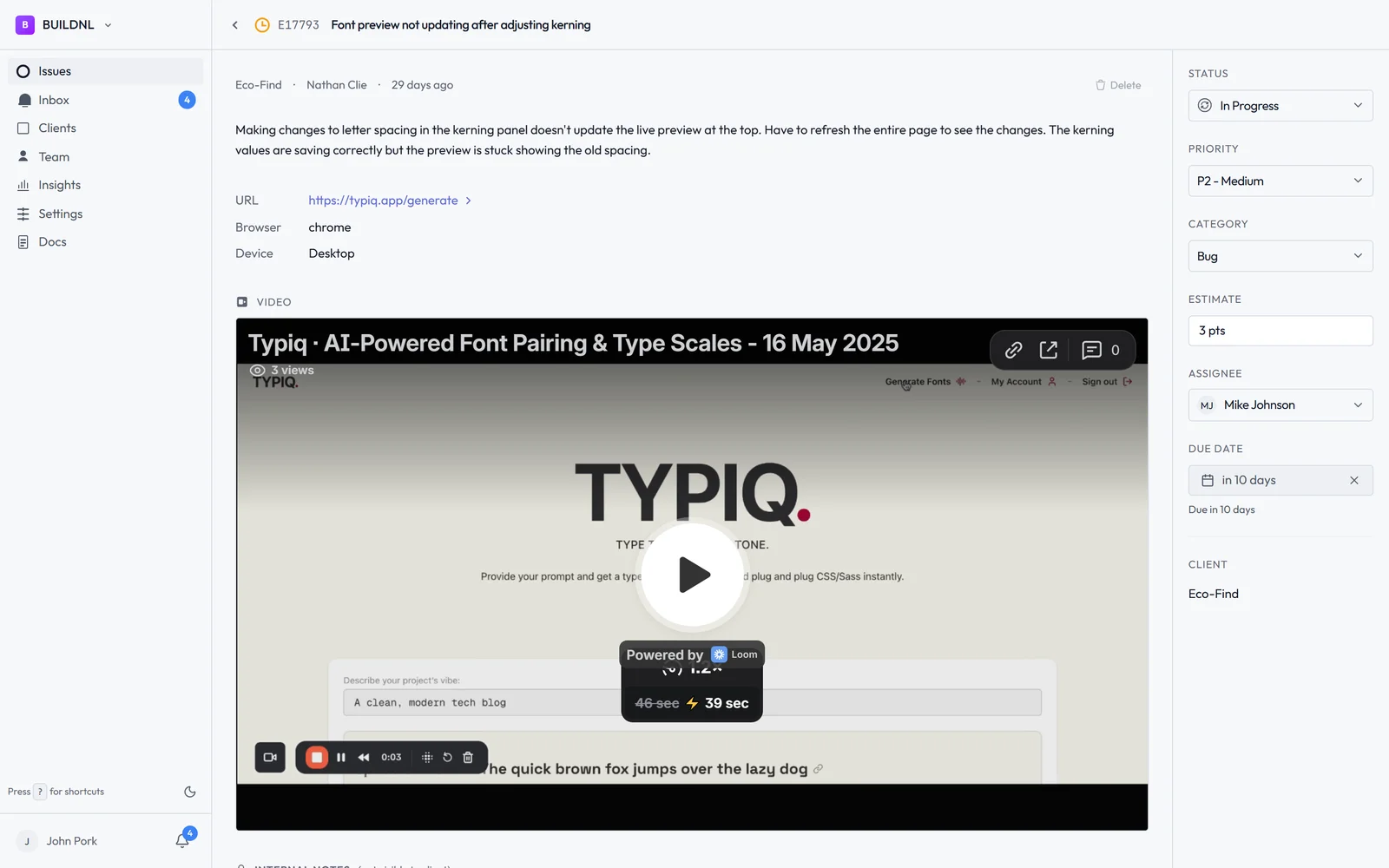
Purpose-built triage dashboard. Bugs in Lantern have statuses, assignees, priority levels, and due dates. You can triage across all clients in one view, see what's overdue, and track response and resolution times per client. It's not a general-purpose project board you've configured to handle bugs — it's a bug tracker, and the interface reflects that. Less setup, more signal.
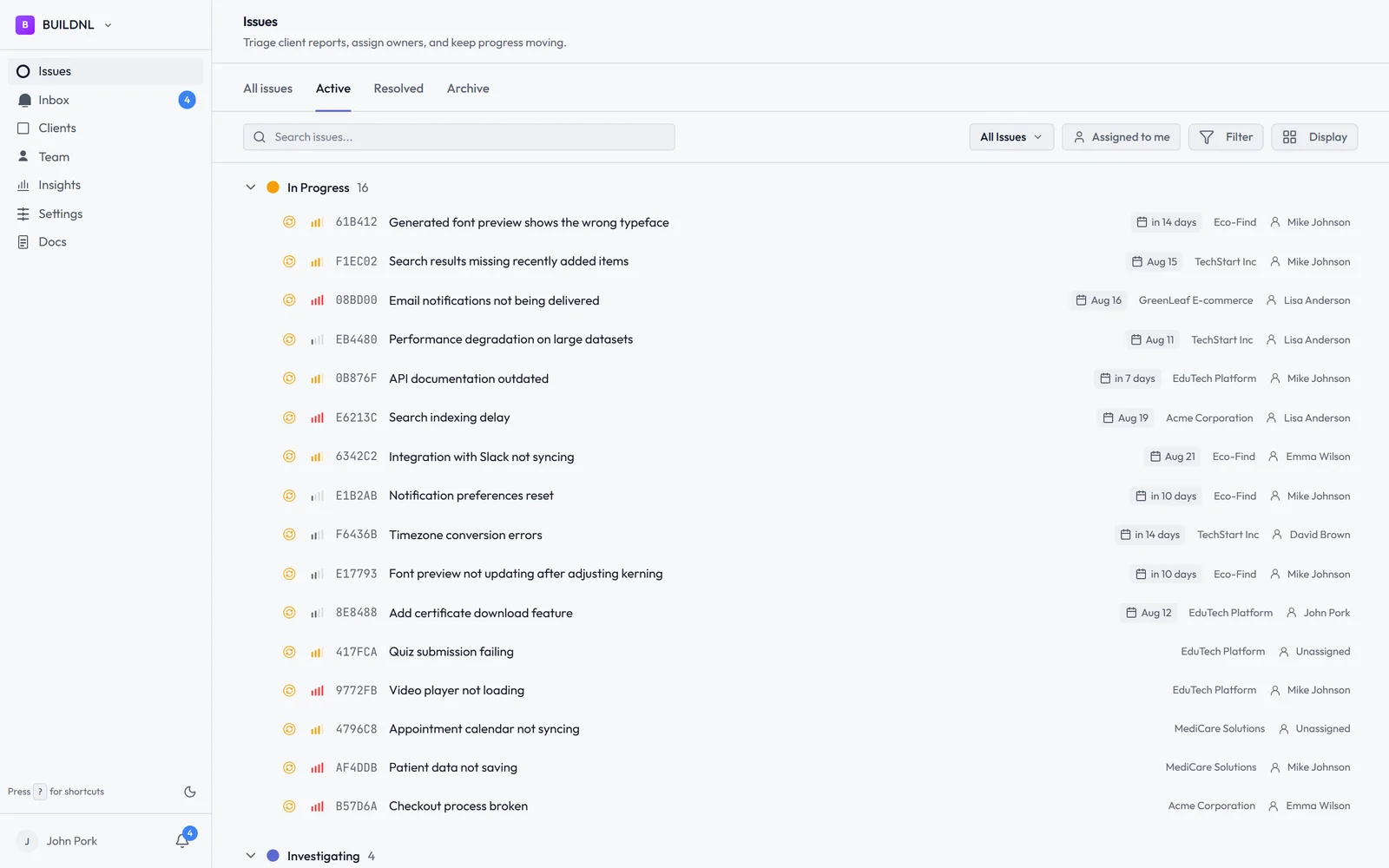
Flat pricing for unlimited clients. Lantern's Team plan is $40/month regardless of how many clients you're managing. No per-seat fees for clients. No cost increase as your agency grows. For agencies that bill by retainer rather than by seat, this model makes more sense.
WordPress plugin and Umbraco package. If you want on-site bug reporting — a floating button embedded in the client's site — Lantern has it built in. The WordPress plugin and Umbraco package render a widget only for logged-in users, invisible to the public. Monday.com has no equivalent.
Pricing Side by Side
Monday.com starts at around $9–12 per seat per month on the Basic plan, but the features most teams actually need (automations, integrations, dashboards) require the Standard or Pro tier, which pushes costs higher. Add client guest seats and you're paying for people who only log in to report an occasional bug.
Lantern:
- Individual: $15.50/mo — 1 user, up to 5 clients, unlimited bugs
- Team: $40/mo — unlimited users, unlimited clients, Jira integration, team analytics
Clients never count as seats in Lantern. The price is the same whether one client submits bugs this month or ten.
Which Should You Choose?
Keep using Monday.com if it's working well for your internal team management and you don't need clients to directly interact with it. Monday.com is excellent for coordinating work across your own team — and if bugs are submitted via email, Slack, or another intake method and then logged internally by your team, Monday.com boards can handle that fine.
Choose Lantern if you need clients to submit bug reports themselves, without friction, without training, and without a new account. If you're managing multiple client sites on support retainers, chasing bug emails, or finding that internal bug boards don't give you visibility across all your clients at once — Lantern is built for that workflow in a way Monday.com isn't.
The core distinction: Monday.com is a team tool that can accommodate clients. Lantern is a client-facing tool built around how agencies actually receive and manage bug reports. Using Monday.com for client bug tracking is like using a spreadsheet for accounting — technically possible, but you'll spend more time maintaining the system than the system saves you.
Start Lantern free for 14 days →
Already using Monday.com internally and want to add client-facing bug tracking without replacing it? Lantern integrates alongside your existing tools — email hello@lanternhq.app to talk through the setup.
Simple bug tracking for agencies. No credit card required.