If you've been searching for a better way to handle client bug reports, you've probably come across Atarim. It's one of the most well-known tools in the WordPress agency world, and for good reason — visual pin feedback directly on a live site is a genuinely clever idea.
But depending on how your agency works, it might not be the right fit. Here's an honest comparison of Atarim and Lantern, so you can decide which one actually fits your workflow.
Quick Comparison
| Feature | Atarim | Lantern |
|---|---|---|
| Pricing model | Per-site (scales with clients) | Flat rate, unlimited clients |
| WordPress integration | ✅ Plugin with visual pins | ✅ Plugin with embedded widget |
| Umbraco support | ❌ No | ✅ Yes (NuGet package) |
| Video bug reports | ❌ No | ✅ Yes (Loom integration) |
| Client portal | Shared workspace | Per-client scoped portal |
| Issue dashboard | Kanban board | Structured bug tracker |
| Jira integration | ✅ Yes | ✅ Yes (with client-to-project mapping) |
| Free trial | ✅ Yes | ✅ 14 days, no credit card |
What Atarim Does Well
Atarim pioneered the idea of visual collaboration on live websites. You install the WordPress plugin, invite your client, and they can click directly on any element of the site to leave a comment. It captures a screenshot, marks the exact location, and logs the feedback as a task.
For design-stage feedback — "move this button left," "this font looks too small on mobile," "the hero section needs more breathing room" — this is genuinely excellent. Clients interact with the real site, point at exactly what they mean, and you get structured feedback without a long email chain trying to decode "the thing at the top."
Atarim is a mature product. It's been around for years, has a large user base in the WordPress community, and integrates with tools like Slack, Asana, Trello, and Jira. If your primary workflow is design reviews and visual QA with clients, it does that job well.
Where Atarim Falls Short for Bug Tracking
The visual pin approach is powerful for design feedback, but it has real limitations when you're dealing with actual bugs.
Interaction bugs are invisible to screenshots. When a client says "the checkout form doesn't work," a screenshot of the form shows you nothing. You need to know what they clicked, in what order, what the page did (or didn't do). A pin on a static screenshot can't capture that.
Clients have to be on the live site. To use Atarim, clients need to be on their website with the plugin active. That's fine for flagging a design issue, but bugs often happen in specific flows — after logging in, during checkout, on a form submission. Getting clients to reproduce a bug in exactly the right context, then click the widget before the state changes, adds friction.
Pricing scales per site. Atarim charges based on the number of active projects. For a freelancer managing three or four WordPress sites, that's manageable. For an agency with fifteen or twenty clients, you're paying a meaningful amount per site — and the cost grows every time you onboard a new client.
It's built for visual feedback, not structured bug tracking. The task boards are functional, but Atarim isn't really a bug tracker. There's no urgency triage, no SLA tracking, no analytics on team response times. It's closer to a collaborative annotation tool than a proper issue management system.
What Lantern Does Differently
Lantern is built specifically for agencies managing multiple client websites as a structured bug tracker, not a design collaboration tool.
Video instead of pins. Every bug report in Lantern includes a short Loom screen recording. Clients click "Report Bug," record thirty seconds showing exactly what went wrong, and submit. You see the browser, the URL, the interaction sequence, the error — everything. No ambiguity, no follow-up questions asking "which page was this on?"
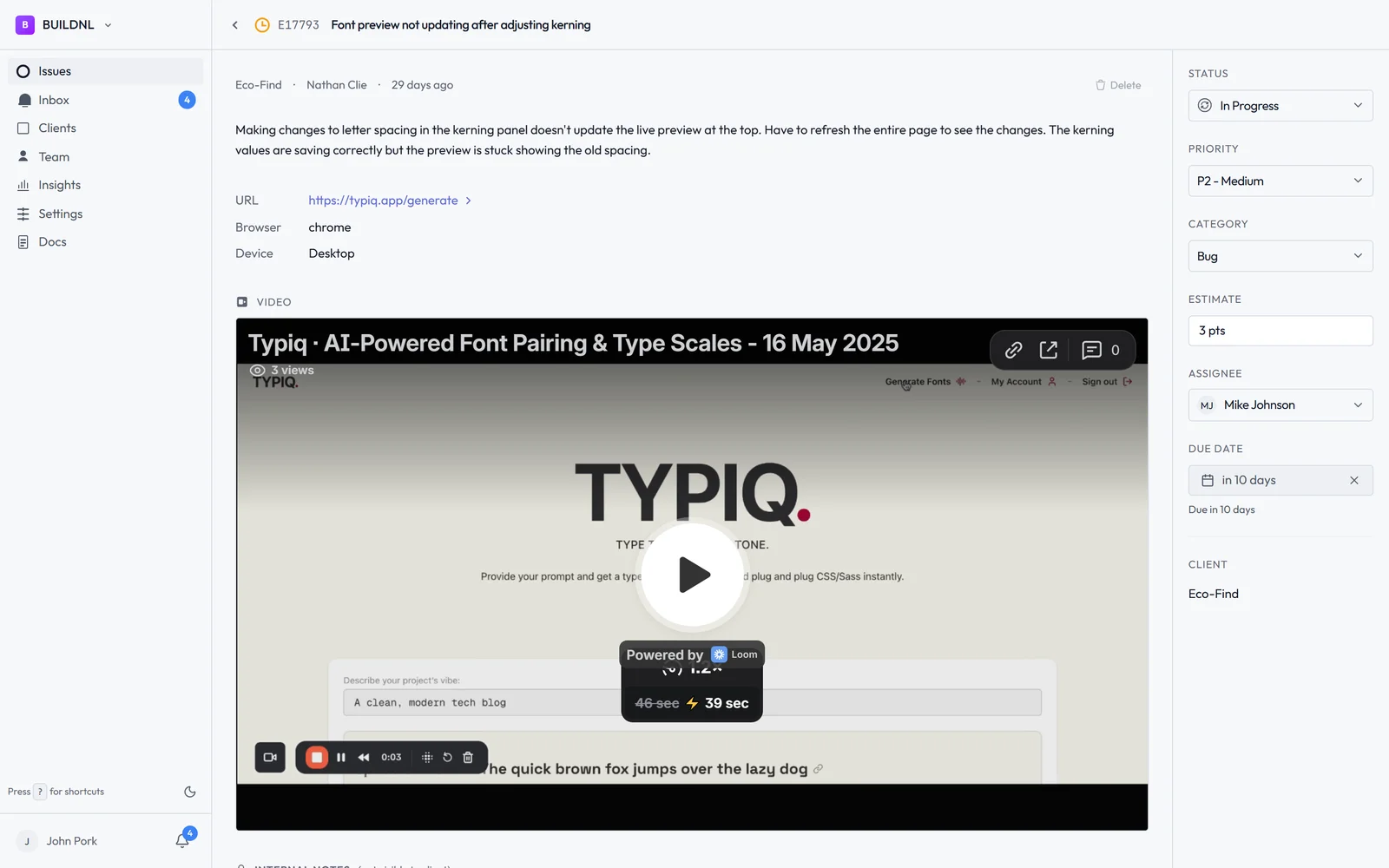
Per-client portals. Each client gets their own portal at a unique link. They don't need to be on the live site. They open the portal in any browser, record their Loom, and submit. Works on any device, no plugin interaction required, and completely invisible to anyone who isn't supposed to see it.
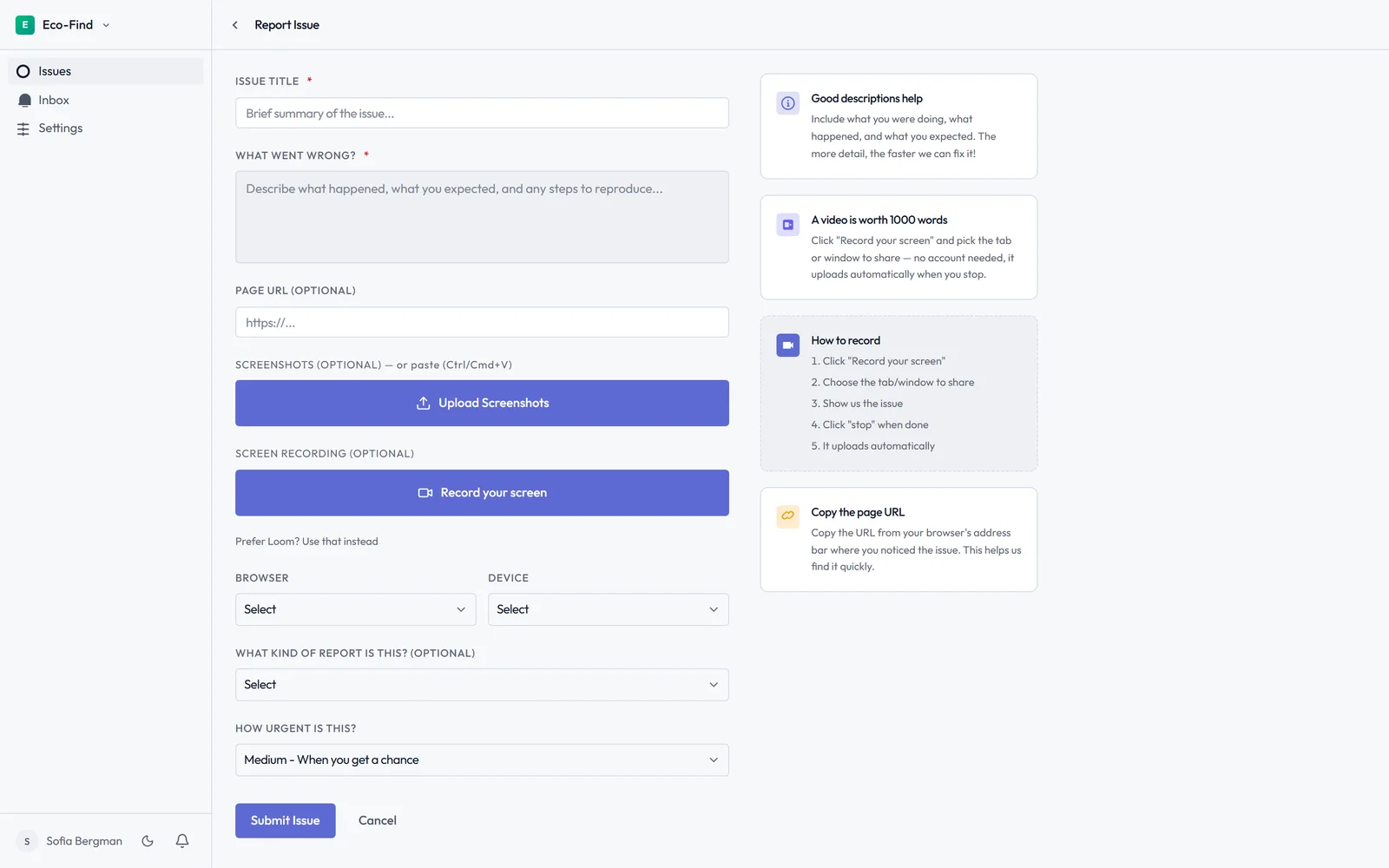
Flat pricing for unlimited clients. Lantern's Team plan is $40/month regardless of how many clients you're managing. Whether you have five clients or fifty, you pay the same. For growing agencies, this makes a significant difference.
WordPress plugin and Umbraco package. If you want an embedded widget on the site — visible only to logged-in users — Lantern offers that too. The WordPress plugin and Umbraco package both render a floating bug report button only for users with a valid session, completely invisible to the public. This gives you the convenience of on-site reporting without the noise.
Jira integration with client-to-project mapping. When a bug is submitted, Lantern can automatically create a Jira ticket in the right project for that client. If you manage ten clients across ten Jira projects, bugs route where they belong without manual sorting.
Pricing Side by Side
Atarim charges per active project. Exact pricing varies by plan, but for agencies, the cost grows linearly with the number of client sites you manage.
Lantern:
- Individual: $15.50/mo — 1 user, up to 5 clients
- Team: $40/mo — unlimited users, unlimited clients, Jira integration, team analytics
For an agency managing 15+ clients, the difference compounds quickly. Lantern's flat pricing means you can onboard every client without worrying about what it adds to your bill.
Which Should You Choose?
Choose Atarim if your primary use case is visual design collaboration and QA. If you're in the middle of a build, doing design reviews, getting sign-off on layouts — Atarim's pin-on-page approach is genuinely the best tool for that job. Clients can point at exactly what they mean, and the visual context is built in.
Choose Lantern if you need structured bug tracking across multiple clients after a site goes live. If your clients are non-technical, if bugs involve interactions rather than static layouts, if you're managing more than a handful of sites, or if you need Jira routing and team analytics — Lantern is built for that workflow.
The honest answer is these tools solve different problems. Atarim is a design feedback and collaboration tool that happens to have a task board. Lantern is a bug tracker that happens to have an optional on-site widget.
If "the form is broken" is something you hear regularly, and tracking it down takes longer than fixing it, that's the problem Lantern is built to solve.
Start Lantern free for 14 days →
Have a question about whether Atarim or Lantern is right for your agency? Email hello@lanternhq.app and we'll give you a straight answer.
Simple bug tracking for agencies. No credit card required.