Asana does a lot of things well. Task management, project timelines, team coordination, workload balancing — if your agency uses Asana to run internal projects, you're probably getting real value from it.
The trouble is scope creep. Asana is so capable that it becomes the default tool for things it was never designed to handle. Client-facing bug tracking is one of them.
The instinct makes sense: Asana has forms, it has task lists, it has status fields, you already pay for it. Why not route bug reports through it? The answer reveals itself quickly once clients are involved.
How Bug Tracking in Asana Usually Works
The typical setup: an Asana form linked to a project, shared with clients via email or a portal page. Clients fill in the form, a task appears in the project, and your team picks it up from there.
On paper this is reasonable. In practice it breaks in several places.
Where Asana Falls Short for Client Bug Reports
Clients have to find and remember the form link
The Asana form lives at a URL your client has to bookmark, remember, or dig out of an email from six months ago. When they notice a bug in their WordPress admin on a Tuesday afternoon, they're not going to hunt for that link — they're going to email you.
There's no embedded widget. No button that appears inside their CMS. No way to get from "I noticed a bug" to "I reported a bug" without leaving whatever they were doing and finding a separate URL.
Form responses miss critical context
Even when clients use the form, they're filling in fields from memory. They may not know their browser version. They might not include the exact URL. They probably won't know whether the issue is mobile-specific or only happens in one browser.
Asana has no automatic capture of browser, OS, device, or URL. Every piece of context has to be explicitly typed in — and most clients don't know what to type.
No video bug reports
Asana supports file attachments. A client could attach a screenshot, or theoretically a screen recording. But there's no recording prompt, no Loom integration, no built-in mechanism to guide clients toward showing you the bug rather than describing it.
"The checkout page has an error" is what you'll get. To find out which error, on which device, under what conditions — that's two or three back-and-forth emails, minimum.
Guest access is limited and confusing
Giving clients any visibility into Asana — even to track the status of their own bug reports — requires managing guest permissions carefully. Clients may see tasks from other projects. The interface is built for team members, not for clients checking in on a single bug they reported. And for visibility alone, requiring clients to maintain an Asana login is more friction than most will accept.
Everything looks like a task, not a bug
Asana tasks don't have a concept of "bug." There are no bug-specific statuses (confirmed, reproducing, fixed, regression), no urgency fields built for this workflow, no way to distinguish a cosmetic issue from a blocking one without building custom fields yourself. You can configure your way around this, but you're doing project management work to set up a bug tracker.
No per-client scoping built in
One project per client means fragmented visibility — your team jumps between projects to see all open bugs. One shared project for all clients risks clients seeing each other's tasks. Neither is a clean answer, and Asana has no native model for "each client sees only their issues, but you see all clients in one view."
What Asana Is Actually Good For
Asana is excellent for structured project delivery: defining milestones, assigning tasks, tracking dependencies, managing team capacity. If your agency uses it for that, great — keep using it for that.
The gap is specifically when clients are the ones submitting bugs. Asana's model assumes the people creating and managing tasks are team members who've been onboarded to the tool. Clients aren't team members. They're non-technical contacts who need the simplest possible path from "I noticed something wrong" to "it's been reported."
How Lantern Compares
| Feature | Asana | Lantern |
|---|---|---|
| Client account required | ✅ Yes (for any visibility) | ✅ Yes, but invite-only |
| Embedded CMS widget | ❌ No | ✅ Yes (WordPress + Umbraco) |
| Video bug reports | ❌ No | ✅ Yes (Loom integration) |
| Auto-captures browser/OS/URL | ❌ No | ✅ Yes |
| Per-client scoped portals | ❌ No | ✅ Built in |
| Bug-specific statuses and triage | ⚠️ Custom setup required | ✅ Built in |
| Flat pricing for unlimited clients | ❌ Per seat | ✅ Yes (£30/month) |
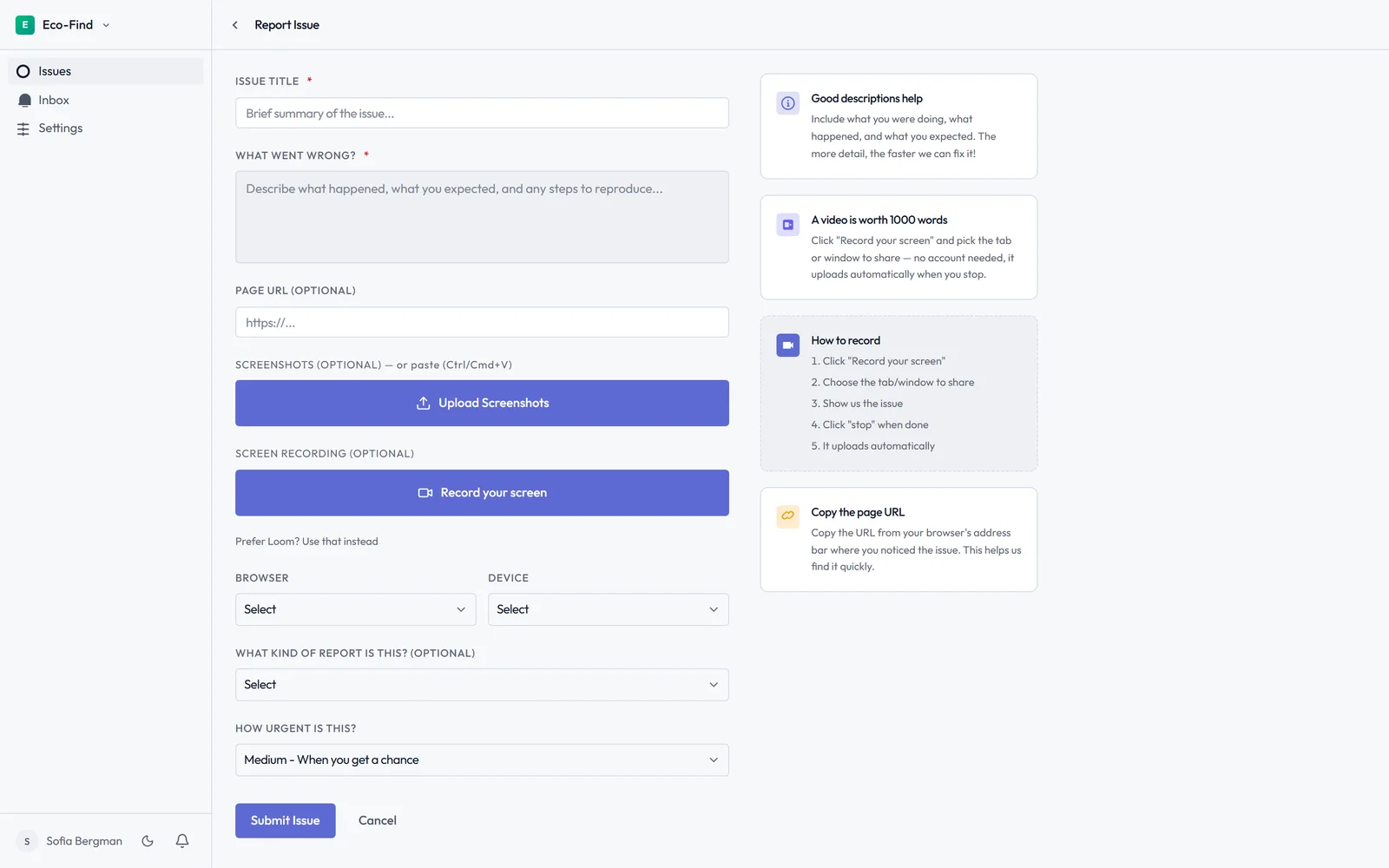
Lantern handles the client-facing side that Asana isn't built for. Each client gets a portal at a secure, invite-only URL — you control who gets access, no public signup involved. The bug report button embeds directly inside their WordPress or Umbraco admin. Clients record a Loom video showing the problem; browser, OS, URL, and screen size are captured automatically.
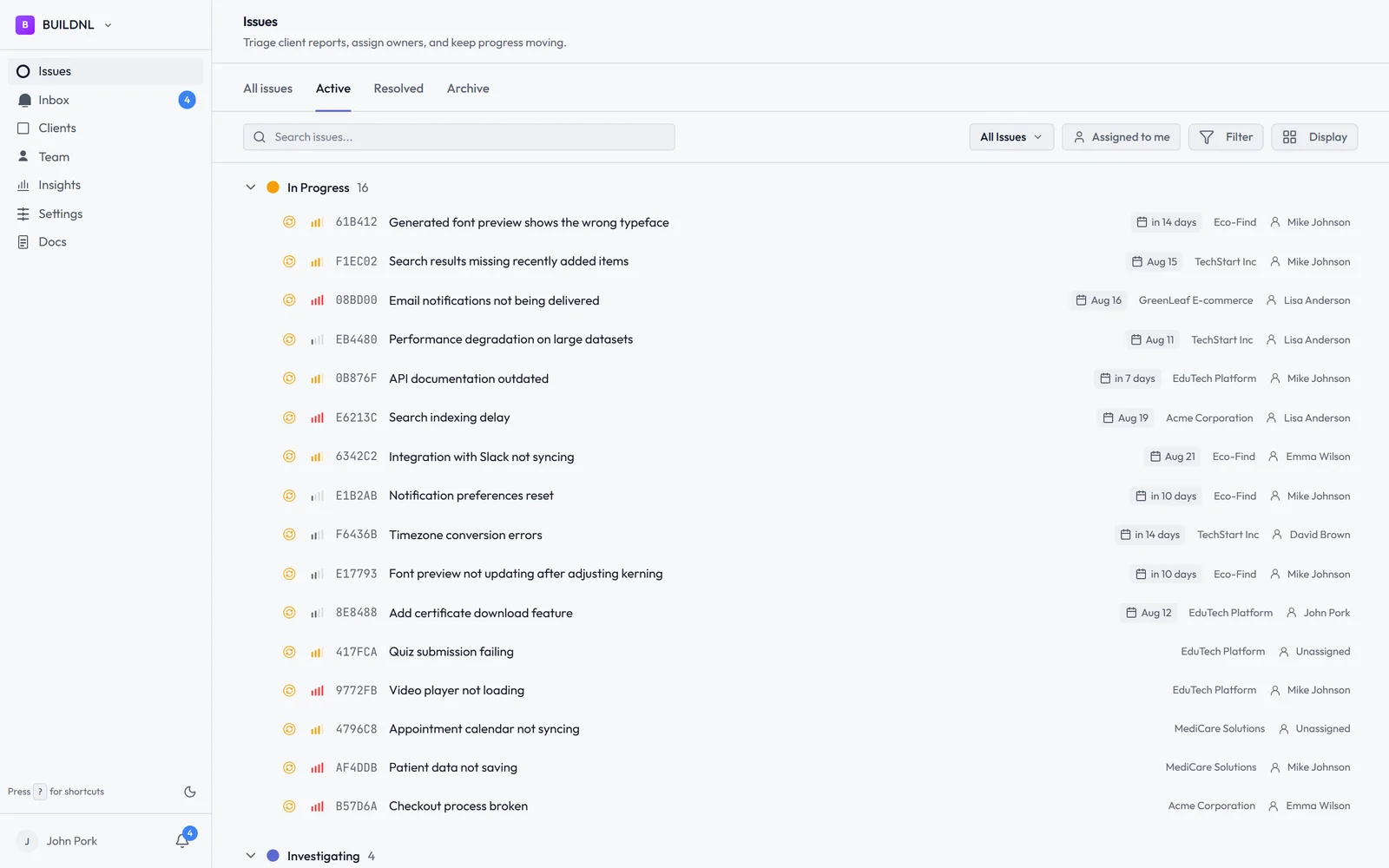
You see all clients' bugs in one dashboard. Clients see only their issues and whether they've been resolved. Status updates happen in Lantern — not in a reply-all email thread.
The Team plan is £30/month flat for unlimited clients. No per-seat costs for clients, no guest access fees.
The Most Common Pattern
Most agencies that use Lantern already have an internal project management tool — Asana, Jira, Linear, ClickUp. Lantern slots in as the client-facing intake layer. Bugs arrive from clients in Lantern; your team triages them there; anything that needs to move into the development workflow goes to Jira via the built-in integration.
The two tools do different things. Asana manages your internal projects. Lantern manages your client bug reports. That's a cleaner separation than asking Asana to do both.
Try Lantern free for 14 days →
No credit card required on the Individual plan.
Using Asana for internal project management and looking for a client-facing bug reporting layer on top? Lantern works alongside your existing setup — email hello@lanternhq.app if you want to talk through how agencies typically integrate it.
Simple bug tracking for agencies. No credit card required.