ClickUp's pitch is hard to argue with: one platform for tasks, docs, goals, time tracking, sprints, and yes — bug tracking. Agencies land there because it's genuinely capable, the free tier is generous, and the promise of replacing five tools with one is appealing.
And internally? ClickUp usually earns its place. It handles complex team workflows well. The custom views, automations, and hierarchy of spaces, folders, and lists give you enough flexibility to model almost anything.
The problem isn't ClickUp. The problem is asking clients to use it.
The Client Experience Problem
ClickUp is built for teams. Its power comes from depth — dozens of field types, nested task structures, multiple views, automations, integrations. That depth is exactly what makes it overwhelming for someone who isn't a ClickUp user, isn't technical, and just needs to tell you that the contact form on their website is broken.
Think about what you're asking a client to do when you add them to a ClickUp workspace: create an account, verify their email, navigate a sidebar with spaces and folders they don't understand, find the right list, create a task, fill in the fields you've set up, and set the correct status. Some clients will manage this once. Most won't manage it twice.
The result is the same as every other internal tool used for client-facing bug tracking: bugs arrive by email anyway, and ClickUp becomes a place your team logs things after the fact.
Where ClickUp Falls Short for Client Bug Reporting
The interface is the wrong size for clients
ClickUp's interface is dense by design. Every view — list, board, calendar, Gantt — is packed with options. For your team, that's power. For a client who logs in quarterly to report a broken image on their homepage, it's confusing. You can simplify with views and permissions, but you're spending setup time solving a problem that purpose-built tools don't have.
Clients still need an account
Guest access in ClickUp requires clients to create an account. Even on restricted views, there's a login step, an onboarding flow, and an interface that looks nothing like the simple "report a bug" experience you'd want clients to have. The barrier is lower than asking them to learn full ClickUp, but it's still a barrier — and barriers mean clients revert to email.
No embedded CMS widget
If you want clients to report bugs from inside their WordPress or Umbraco admin — where they actually encounter them — ClickUp has no mechanism for it. You'd need to embed a form via third-party integration, and that form would have no connection to the CMS context: no session data, no automatic URL capture, no browser detection.
Clients would have to leave their CMS, open a separate link, fill in what they remember, and submit. Most won't. The bug gets reported by email, or not at all.
No video bug reports
ClickUp supports file attachments, so a client could theoretically record a video and attach it. There's no built-in recording prompt, no Loom integration, and no native mechanism to guide clients toward video. In practice, they write text descriptions — which are rarely complete enough to reproduce a bug without follow-up.
"The button doesn't work" goes into ClickUp. You reply asking which button, on which page, in which browser. They reply two days later. Three messages before a developer looks at the bug.
Per-seat pricing compounds as you grow
ClickUp's free tier works for small teams, but advanced features — custom fields, unlimited integrations, goals — require paid plans. More importantly, if clients need any level of access, they count as users. For agencies managing 15 or 20 clients, adding even limited guest seats for each one adds up. You end up either paying for access most clients barely use, or restricting access so much that clients have no visibility into their bug status.
What ClickUp Is Actually Good For
To be clear: ClickUp is a legitimate tool for internal agency work. Sprint planning, task management, doc storage, team coordination — it handles these well. If your team uses ClickUp internally and bug reports flow in from email or another intake system, then your team logs them in ClickUp, that workflow is fine.
The issue is specifically the client-facing side. ClickUp is the wrong tool for bug intake when the people submitting bugs are non-technical clients who haven't been onboarded to your internal systems.
How Lantern Compares
| Feature | ClickUp | Lantern |
|---|---|---|
| Client account required | ✅ Yes | ✅ Yes, but invite-only |
| Embedded CMS widget | ❌ No | ✅ Yes (WordPress + Umbraco) |
| Video bug reports | ❌ No | ✅ Yes (Loom integration) |
| Auto-captures browser/OS/URL | ❌ No | ✅ Yes |
| Per-client scoped portals | ❌ No | ✅ Built in |
| Client status visibility | ⚠️ Requires ClickUp login | ✅ Client portal |
| Built for agency bug workflows | ❌ General purpose | ✅ Purpose-built |
| Flat pricing for unlimited clients | ❌ Per seat | ✅ Yes (£30/month) |
Lantern is built for the part ClickUp gets wrong: getting bug reports from clients, without accounts, without onboarding, and without clients having to leave their CMS.
Each client gets a portal at a unique URL. No sign-up required. The bug report button embeds inside their WordPress admin or Umbraco backoffice — visible only to logged-in users, invisible to visitors. Clients can record a Loom video showing exactly what's broken. Browser, OS, URL, and screen size are captured automatically.
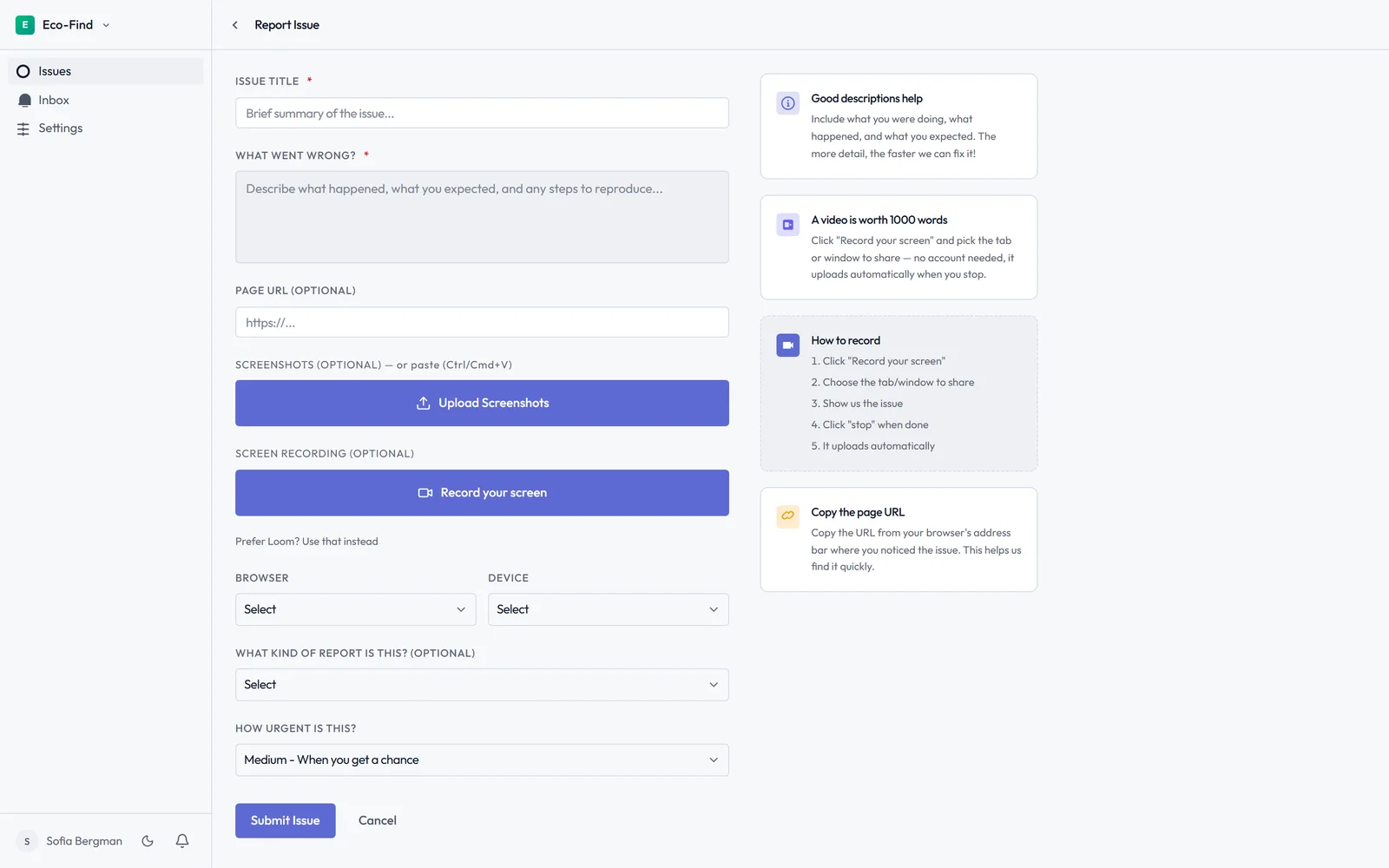
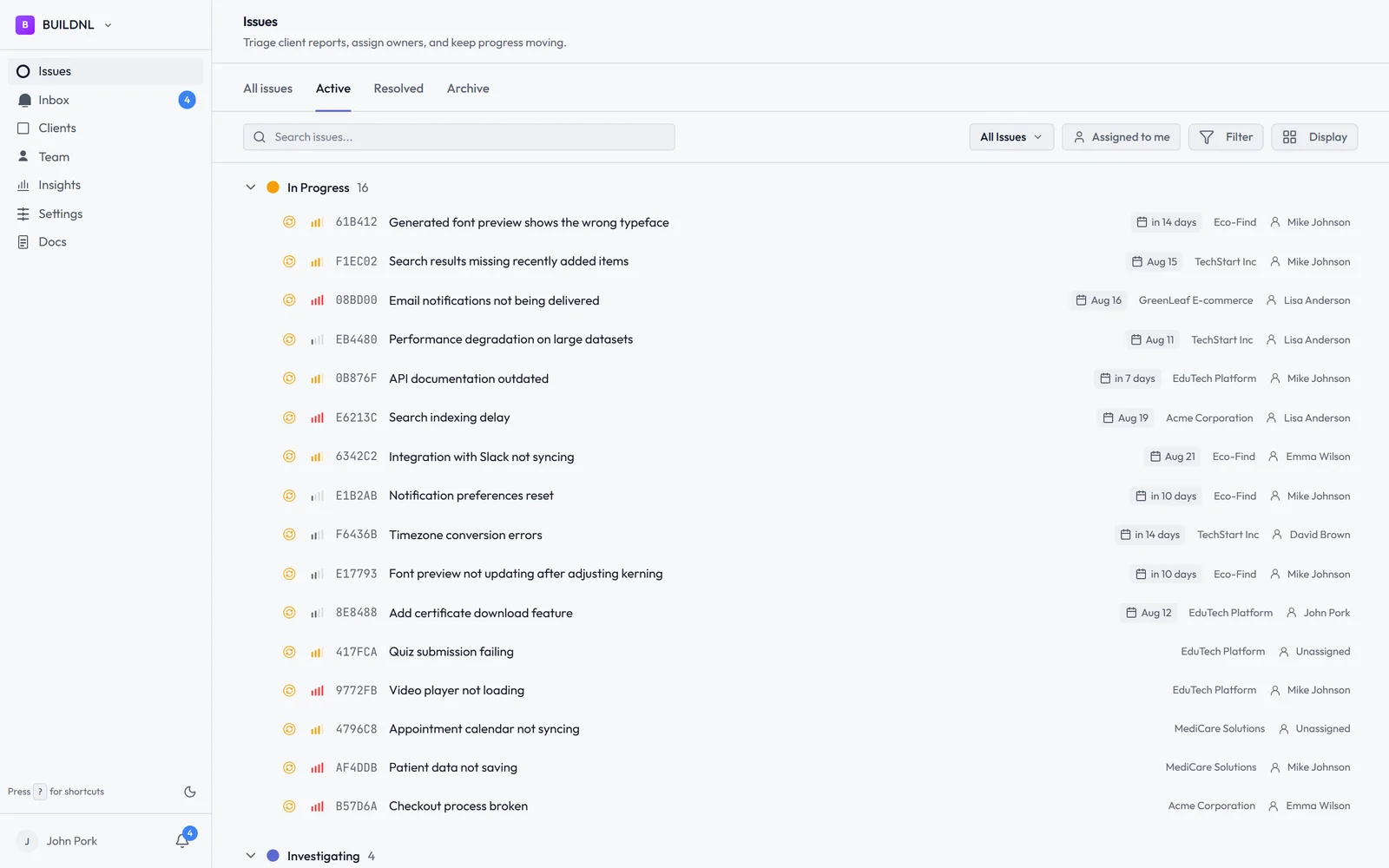
You see all bugs across all clients in one dashboard. Clients see only their own issues and status updates. No email chains to find out if someone looked at a bug.
The Team plan is £30/month flat for unlimited clients and unlimited team members. No per-seat fees for clients.
The Right Setup for Most Agencies
The most common pattern is: ClickUp (or Jira, or Linear) internally for dev workflow, and Lantern as the client-facing intake layer. Bugs arrive in Lantern from clients, your team triages them, and critical ones get pushed to your internal tracker via the Jira integration.
You keep your internal workflow. Clients get a simple, professional experience. And you stop receiving "the website is broken" emails with no context.
Try Lantern free for 14 days →
No credit card required on the Individual plan.
Already using ClickUp for internal project management? Lantern works alongside it — client bug reports flow into Lantern, and you can integrate with Jira for your dev workflow without changing how your team works.
Simple bug tracking for agencies. No credit card required.