Pastel comes up a lot when agencies go looking for a client feedback tool. It's genuinely easy to use — paste in a URL, share a link, and clients can leave comments pinned directly to elements on the page. No setup, no plugin, no account required for reviewers.
For quick visual sign-offs, it's hard to beat. But if you're managing ongoing bug reports across multiple clients, it starts to show its limits. Here's an honest look at how Pastel and Lantern compare, and which is the better fit depending on how your agency actually works.
Quick Comparison
| Feature | Pastel | Lantern |
|---|---|---|
| Installation required | ❌ None (URL-based) | ❌ None (portal-based) |
| Pricing model | Per-reviewer / per-project | Flat rate, unlimited clients |
| Video bug reports | ❌ No | ✅ Yes (Loom integration) |
| Client portals | ❌ No | ✅ Yes, per-client |
| Issue tracking dashboard | ❌ Basic (feedback threads) | ✅ Full (statuses, triage, assignees) |
| WordPress integration | ❌ No | ✅ Plugin with embedded widget |
| Umbraco support | ❌ No | ✅ Yes (NuGet package) |
| Jira integration | ❌ No | ✅ Yes (with client-to-project mapping) |
| Free trial | ✅ Yes | ✅ 14 days, no credit card |
What Pastel Does Well
Pastel's core idea is simple and well-executed: give someone a link, and they can annotate any live website without installing anything or creating an account. You paste in the URL of the page you want reviewed, Pastel wraps it in a commenting layer, and reviewers can click anywhere to leave feedback pinned to that exact spot.
The UI is clean and minimal. It doesn't feel like enterprise software — clients who've never used a feedback tool before can figure it out in thirty seconds. For freelancers doing a one-page design review, or small agencies getting sign-off on a new build before handover, this workflow is fast and low-friction.
Pastel also has a reasonable annotation system. Comments are threaded, you can mark feedback as resolved, and there's a basic task list view. It does what it promises without overcomplicating things.
Where Pastel Falls Short for Agencies
The lightweight approach that makes Pastel quick to use also limits what it can do once a site goes live and bugs start coming in.
Feedback lives in Pastel, not a proper issue tracker. Pastel is built for review cycles — you share a canvas, collect comments, resolve them, and move on. It's not designed for ongoing bug tracking where issues need statuses, assignees, urgency levels, due dates, and a running history of what's been reported and fixed. There's no real dashboard to triage incoming bugs across clients.
No client portals. Every Pastel canvas is a separate link for a specific page or review session. There's no persistent space where a client can go to see all their open issues, check the status of something they reported last week, or submit a new bug. For post-launch support, you'd be creating new canvases and sharing fresh links every time — which is clunky and doesn't give clients any continuity.
Interaction bugs don't translate to annotations. Like any screenshot-annotation tool, Pastel captures a moment in time. If a client's bug is "the checkout breaks after I apply a discount code," no pin on the page is going to communicate the sequence of steps, what they saw, what they expected. You'll still end up in an email chain trying to piece together what happened.
Pricing scales with reviewers and projects. Pastel charges based on the number of active projects and reviewers. For an agency with a rotating roster of clients and contacts, costs add up. You're also paying per review session rather than per ongoing client relationship, which doesn't map well to support retainers.
What Lantern Does Differently
Lantern is built for the post-launch phase — ongoing bug tracking across multiple client sites, rather than design reviews during a build.
Video-first bug reports. Instead of pinning a comment to a screenshot, clients record a short Loom screen recording of the issue. You see the browser, the URL, every click and interaction leading up to the problem. A thirty-second video eliminates most of the follow-up questions that make bug tracking slow. "The button doesn't work" stops being a mystery when you can watch exactly what the client did.
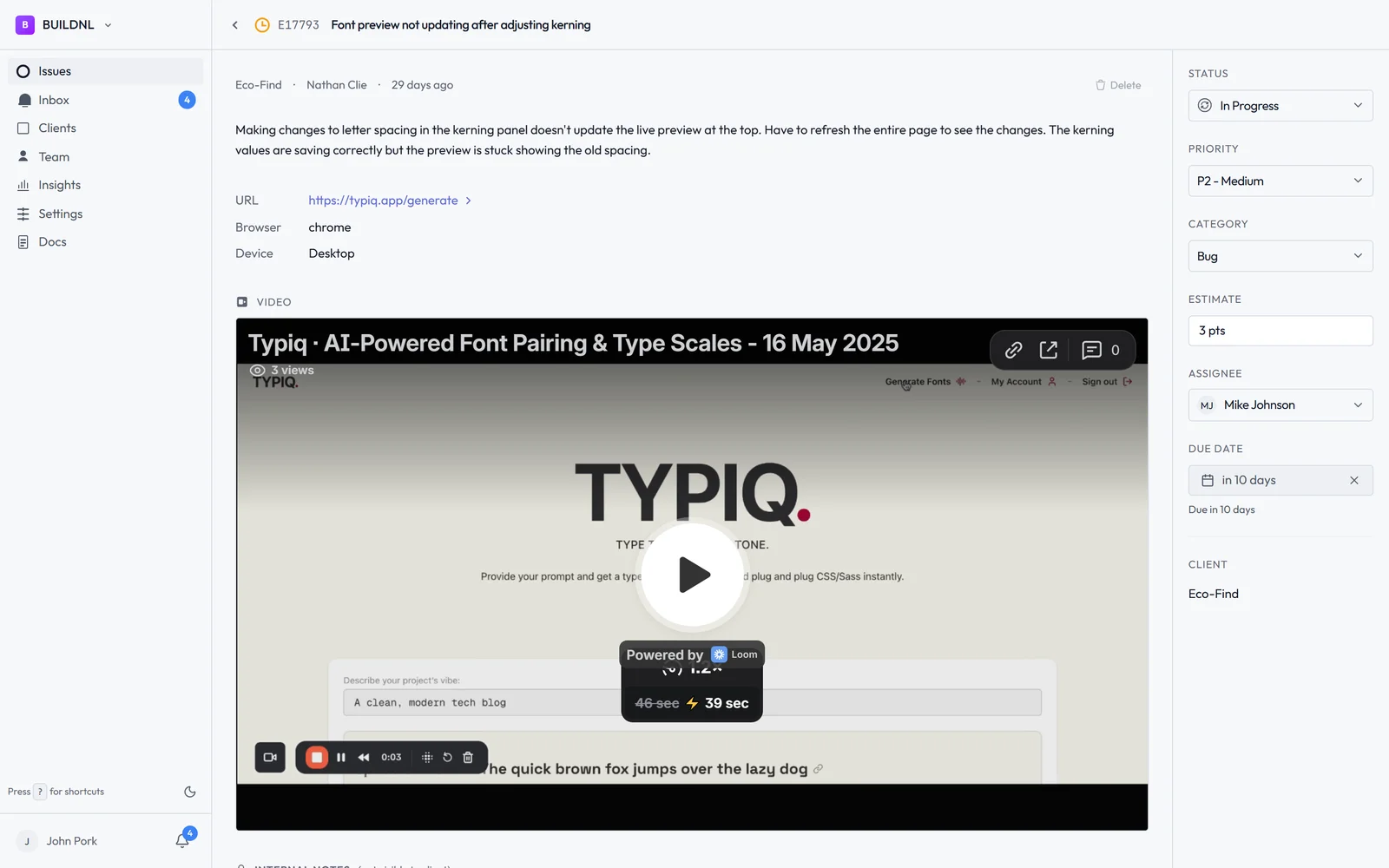
Per-client portals. Each client gets their own persistent portal at a unique link. They use it to submit bugs, check status on open issues, and see what's been resolved. It's not a one-off review canvas — it's a continuous support channel. Clients always know where to go, and nothing falls through the cracks.
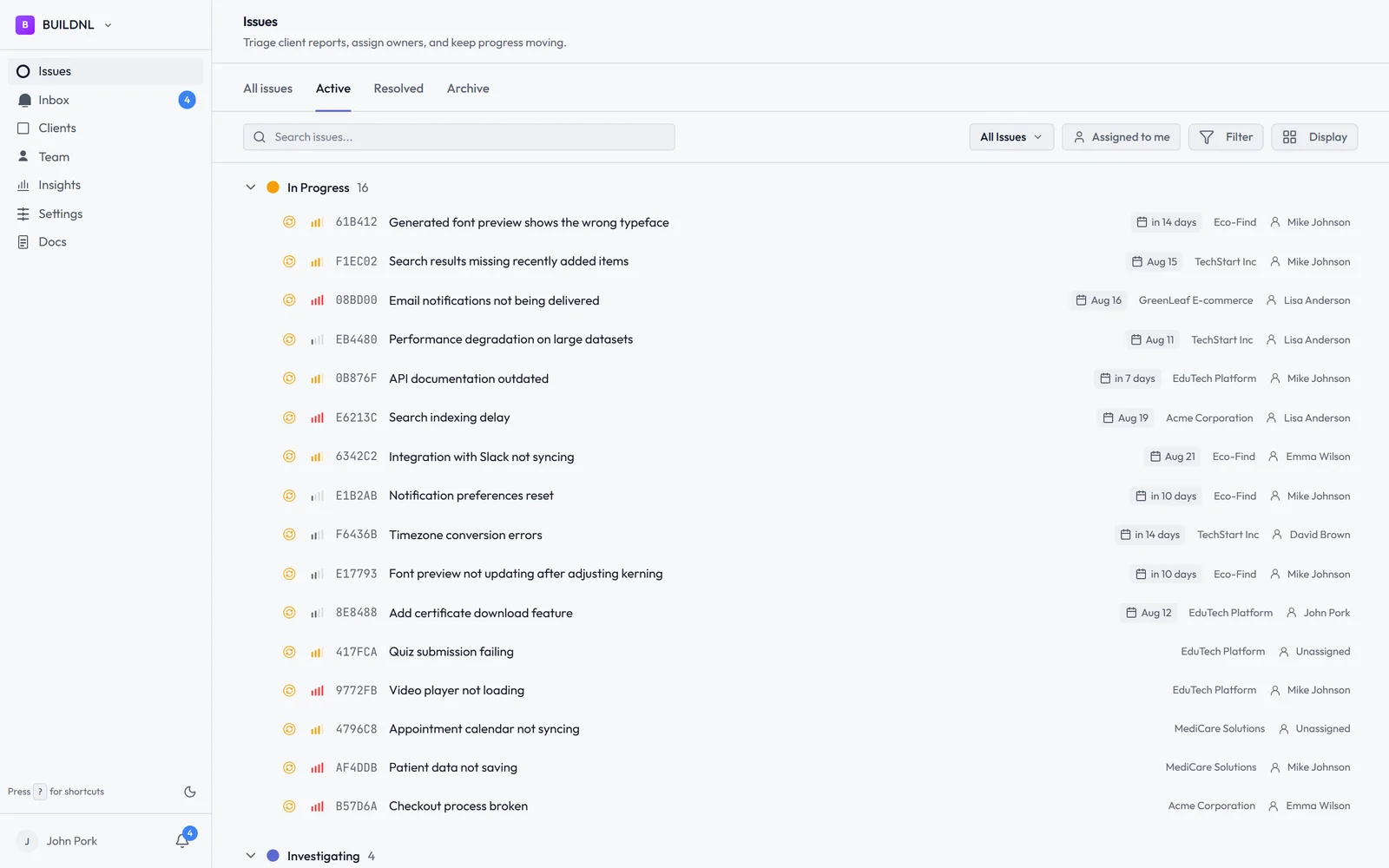
A proper issue tracking dashboard. Every bug in Lantern has a status (Open, In Progress, Resolved), an assignee, a priority level, and optional due dates. You can triage across all clients in one view, filter by urgency, and track what's overdue. There's also team analytics showing response and resolution times — useful for agencies with SLAs or time-tracked retainers.
WordPress plugin and Umbraco package. If you want bug reporting embedded directly in a client's site — visible only to users with a session, invisible to the public — Lantern has that too. The WordPress plugin and Umbraco package add a floating report button that only appears for logged-in users. You get the convenience of on-site reporting without cluttering the live site for regular visitors.
Flat pricing for unlimited clients. Lantern's Team plan is $40/month no matter how many clients you're managing. Whether you're onboarding your fifth client or your fiftieth, the cost stays the same. No per-project fees, no per-reviewer seats.
Pricing Side by Side
Pastel charges based on active projects and the number of reviewers who can leave feedback. Costs scale as you add clients and collaborators — reasonable for occasional reviews, less so for continuous multi-client support.
Lantern:
- Individual: $15.50/mo — 1 user, up to 5 clients, unlimited bugs
- Team: $40/mo — unlimited users, unlimited clients, Jira integration, team analytics
For agencies running support retainers across ten or more clients, the pricing structure matters. Lantern's model is built for scale; Pastel's isn't.
Which Should You Choose?
Choose Pastel if your primary need is lightweight visual feedback during the design and build phase. Sharing a Pastel link with a client for a pre-launch review is fast, frictionless, and doesn't require any setup on either side. For one-off annotation sessions where you just need a client to click on things and comment, it genuinely delivers.
Choose Lantern if you're managing ongoing bug reports after sites go live. If clients are reporting issues weeks or months after launch, you need more than a feedback canvas — you need an issue tracker. Portals that clients can return to, statuses they can check, a dashboard you can triage, and integrations that route bugs into your dev workflow automatically.
The difference comes down to the phase of the project. Pastel is a review tool. Lantern is a support tool. Many agencies actually need both at different stages — Pastel during the build for design sign-off, Lantern after launch for ongoing maintenance.
If bug tracking is your pain point right now — if you're still chasing vague bug emails, losing issues in Slack, or manually copying client feedback into Jira — that's the problem Lantern is built to solve.
Start Lantern free for 14 days →
Deciding between Pastel and Lantern for your agency? Email hello@lanternhq.app and we'll help you figure out which fits your workflow.
Simple bug tracking for agencies. No credit card required.