Feedbucket sits in a useful niche: an embeddable bug reporting widget that captures screenshots, console logs, and browser metadata automatically. For development teams who want technical context attached to every report, it solves a real problem.
But if you're an agency managing a growing roster of client sites, the per-site pricing model and lack of structured issue tracking start to create friction. Here's an honest comparison of Feedbucket and Lantern to help you figure out which fits your workflow.
Quick Comparison
| Feature | Feedbucket | Lantern |
|---|---|---|
| Pricing model | Per-site (scales with clients) | Flat rate, unlimited clients |
| Video bug reports | ❌ No | ✅ Yes (Loom integration) |
| Client portals | ❌ No | ✅ Yes, per-client |
| Console log capture | ✅ Yes (automatic) | ❌ No |
| WordPress integration | ✅ Widget embed | ✅ Plugin with session-gated widget |
| Umbraco support | ❌ No | ✅ Yes (NuGet package) |
| Issue tracking dashboard | ⚠️ Basic | ✅ Full (statuses, triage, assignees) |
| Jira integration | ✅ Yes | ✅ Yes (with client-to-project mapping) |
| Free trial | ✅ Yes | ✅ 14 days, no credit card |
What Feedbucket Does Well
Feedbucket's strongest feature is automatic technical context capture. Install the JavaScript widget on a site, and every bug report comes bundled with a screenshot, browser and OS details, the JavaScript console log at the time of submission, and any custom metadata you choose to pass in. Developers get a properly formed report without having to ask the client "what browser were you using?" or "were there any errors on the page?"
For development teams building their own products — where users might be technical, where JavaScript errors are a common root cause, and where a single widget covers your entire surface area — this is genuinely valuable. The setup is simple: one script tag, and the report button appears on the site.
Feedbucket also integrates with Jira, Trello, GitHub, and other project management tools, so captured bugs can flow into your existing workflow automatically. For small teams managing one or two sites, it does the job well without much overhead.
Where Feedbucket Falls Short for Agencies
The per-site pricing model is the biggest limitation for agencies. Feedbucket charges based on the number of active projects. Every time you onboard a new client, the cost goes up. For a freelancer with two or three sites, this is manageable. For an agency with fifteen or twenty clients — and a pipeline of new ones — you're paying a meaningful and growing subscription cost just to extend the same functionality to each new site.
No client-scoped portals. Feedbucket is a capture widget, not a client relationship tool. There's no persistent space where a specific client can log in, see their open issues, check the status of something they reported, or track what's been resolved. Each widget on each site reports into a flat stream of issues in your Feedbucket account. Managing a dozen clients means managing a dozen separate project inboxes with no overarching structure.
No video bug reports. The automatic screenshot is useful for static visual bugs, but interaction bugs — the kind clients most often struggle to describe — still require follow-up. If the issue is "the payment modal doesn't close after I submit," a screenshot of the open modal doesn't tell you whether it errored silently, whether the submission fired at all, or whether it's a CSS stacking issue. You still end up in an email thread. Video eliminates that entirely.
Limited issue tracking. Feedbucket's dashboard gives you a list of submitted reports with filters and status tags, but it's not a full issue tracker. There's no urgency triage, no due dates, no analytics on team response or resolution times, and no way to see which clients are generating the most bugs at a glance. For agencies running support retainers with SLAs, the visibility just isn't there.
What Lantern Does Differently
Lantern approaches bug tracking from the agency workflow outward, rather than from the widget inward.
Video via Loom, not screenshots. When a client reports a bug, they record a short Loom screen capture showing exactly what happened. You see the browser, the URL, the sequence of interactions, the error or unexpected behaviour — everything. A thirty-second video replaces the five-email chain you'd otherwise have trying to understand a vague report. For non-technical clients, recording a video is easier than writing a clear bug description, and the result is far more useful.
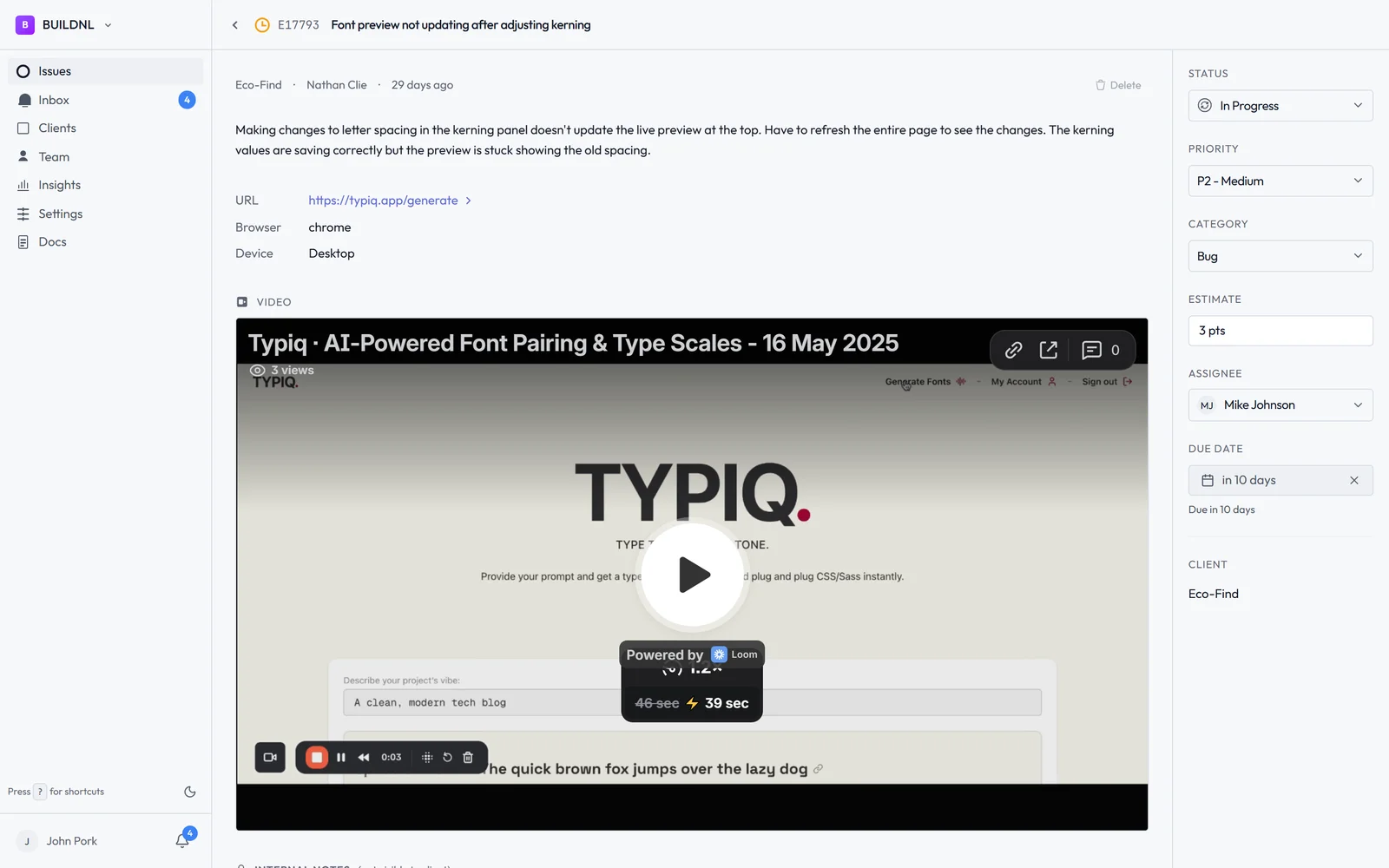
Per-client portals. Every client gets their own portal at a persistent link. They go there to report bugs, check what's been resolved, and see what's in progress. It's not a review canvas or a one-time link — it's a continuous support channel that lives alongside the client relationship. Nothing gets mixed with another client's issues, and clients always know where to go.
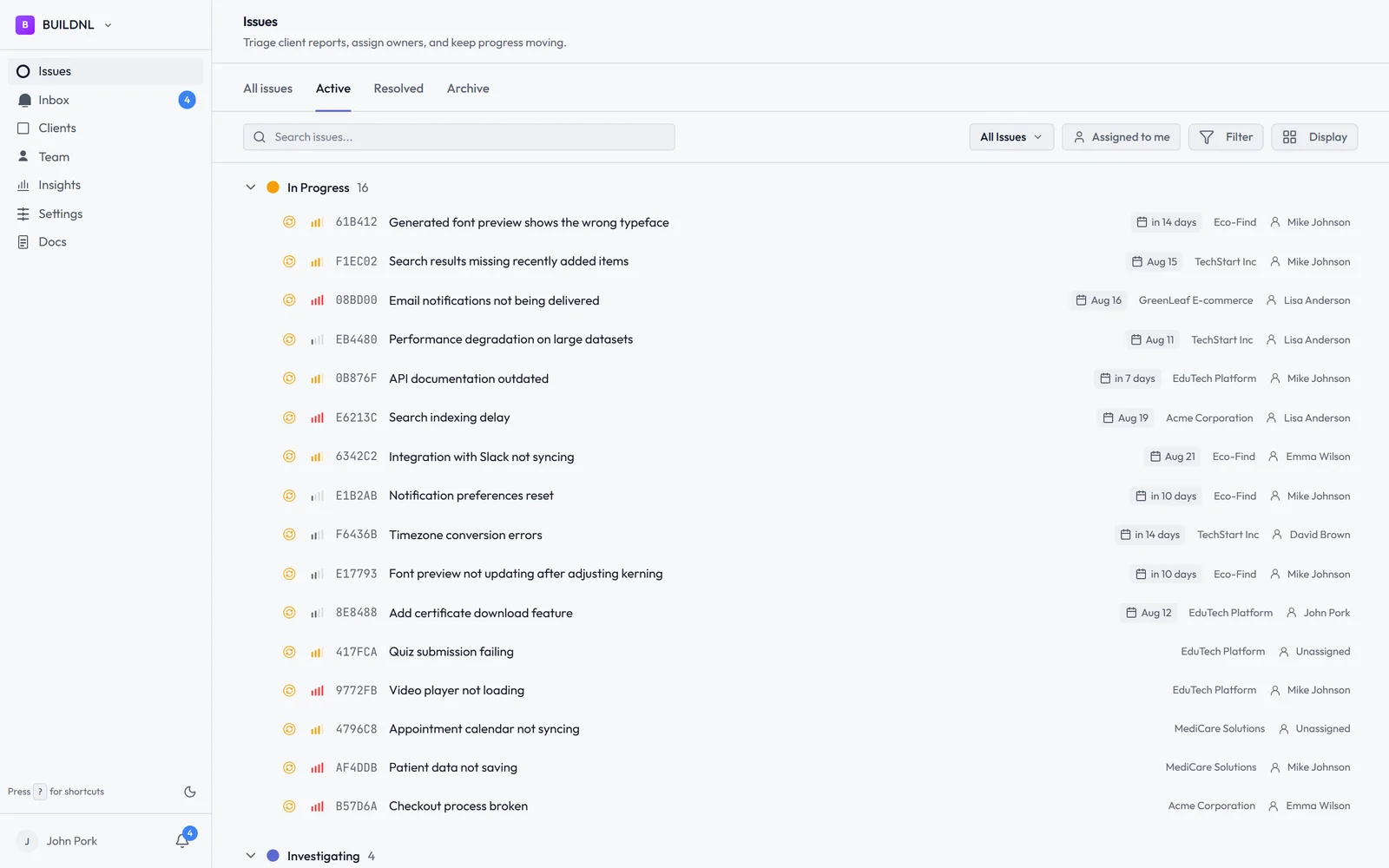
Proper issue tracking. Bugs in Lantern have statuses, assignees, priority levels, and optional due dates. You can triage across all clients in a single view, filter by urgency, and see what's overdue. Team analytics track response and resolution times per client and per team member — useful if you're billing by time, managing SLAs, or just trying to spot bottlenecks.
Flat pricing for unlimited clients. Lantern's Team plan is $40/month regardless of how many clients you're managing. Onboard your tenth client or your thirtieth — the price doesn't change. For agencies with active pipelines, this matters.
WordPress plugin and Umbraco package. If you want an embedded on-site widget rather than a standalone portal, Lantern has that too. The WordPress plugin and Umbraco package both render a floating bug report button that's only visible to logged-in users — completely invisible to the public. You get the convenience of in-context reporting without the widget showing up for regular visitors.
Pricing Side by Side
Feedbucket charges per active project. Costs grow as you add client sites, making it expensive to maintain as an agency scales.
Lantern:
- Individual: $15.50/mo — 1 user, up to 5 clients, unlimited bugs
- Team: $40/mo — unlimited users, unlimited clients, Jira integration, team analytics
For agencies managing ten or more client sites, the difference adds up quickly. Lantern's flat model means the cost of supporting a new client is zero.
Which Should You Choose?
Choose Feedbucket if automatic console log capture is important to your workflow and you're managing a small number of sites. If your clients are technical, if JavaScript errors are a regular cause of bugs, and if you want that technical metadata attached to every report without asking, Feedbucket's automatic capture is a genuine advantage. For a team managing one to five sites, the per-site pricing is reasonable for what you get.
Choose Lantern if you're managing multiple clients on ongoing support retainers, your clients are non-technical, and you need more than a capture widget. Video bug reports remove the ambiguity that console logs can't address — most client-reported bugs aren't JavaScript errors, they're "something didn't work the way I expected." Persistent client portals, structured triage, and flat pricing make Lantern a better fit as agency headcount and client count grows.
The honest distinction: Feedbucket is a technical bug capture tool. Lantern is an agency bug tracking system. If the gap between "client reports a bug" and "developer understands the bug" is your main problem, and that gap is mostly about missing technical context, Feedbucket helps. If the gap is about miscommunication, disorganisation across clients, or simply not having a proper place for bugs to live — that's what Lantern is built for.
Start Lantern free for 14 days →
Questions about whether Feedbucket or Lantern is the right fit for your agency? Email hello@lanternhq.app and we'll give you a straight answer.
Simple bug tracking for agencies. No credit card required.