If you've run a web agency for more than a year, you've probably built the board.
Three lists: Reported. In Progress. Fixed. A card for each bug, labelled by client. Maybe a colour-coded label system you spent 45 minutes setting up. It felt organised. It felt like a system.
Then the first client never looked at it. The second one lost the invite email. The third one did log in, created a card that said "website broken," and never replied to your follow-up asking what that meant.
The board is still there. You're the only one who uses it.
This is the Trello bug tracking story for most agencies. Not because Trello is bad — it's genuinely one of the best Kanban tools available. Because it was built for internal team workflows, not client-facing bug submission, and that difference matters more than it looks like from the outside.
Why Agencies Start in Trello
Trello is free, visual, and already familiar to most teams. It's flexible enough to model almost any workflow with lists and cards, and the drag-and-drop interface makes it satisfying to move something from "In Progress" to "Fixed."
For internal bug tracking — where your team logs bugs and moves them through a workflow — Trello is fine. The problem surfaces the moment you need clients to be part of the process.
Where Trello Breaks Down for Client Bug Tracking
Clients need a Trello account to contribute
Submitting a bug in Trello requires a Trello account. That means asking clients to sign up, verify their email, accept a board invite, and learn enough about Trello to create a card in the right list with the right label. Most won't. A few will try once, forget their login, and default back to email. The ones who do use it will create cards like "the thing on the right side of the homepage" and leave you to figure out the rest.
There's no widget — clients have to leave their CMS to report bugs
When a client notices a bug in their WordPress admin or Umbraco backoffice, they'd need to stop what they're doing, open a new tab, navigate to your shared Trello board, and create a card from memory. That context switch is too much friction. Bugs get forgotten, or they get emailed instead — which defeats the purpose of having a system.
Cards are just text and attachments
A Trello card is a blank canvas. You can add a description, attach files, add labels, set due dates. But there are no enforced fields. Clients aren't prompted to include browser info, device, URL, or steps to reproduce. Every card looks different depending on what the client thought to include. You end up asking follow-up questions before you can touch the bug.
There's no Loom integration, no screen recording prompt, no automatic capture of browser or OS. What you get is whatever the client typed in the description field.
One board for everything, or one board per client
Neither option works well. A single board across all clients mixes bugs from different sites in one view — workable for small agencies, chaotic at scale. Separate boards per client means jumping between workspaces constantly, with no way to see all open bugs across all clients at once. Trello has no native concept of a "client-scoped" view that shows each client only their issues.
Clients can't track what's happening without logging in
Once a client submits a bug (or you log one on their behalf), they have no visibility into status unless they actively go back to Trello and check. Most won't. So they email to ask if you've seen it. You reply. They email again next week. The tool that was supposed to reduce email creates more of it.
Power-Ups add up
Trello's free tier is limited. Anything approaching a real workflow — automations, custom fields, calendar view — pushes you to Power-Ups, and Power-Ups push you toward a paid plan. You end up paying for a project management tool to do a mediocre job of something a purpose-built bug tracker does out of the box.
What Agencies Actually Need
The gap between "Trello board" and "purpose-built bug tracker" comes down to a few specific things:
- Clients can report bugs without an account or onboarding — the bar to submit must be as low as possible
- The reporting button lives where clients already are — inside their CMS, not in a separate tool they have to remember
- Every report captures the same structured information — browser, device, URL, urgency — automatically, not by asking clients to fill in fields
- Developers can see all open issues across all clients in one view — not jumping between boards
- Clients can see the status of their issues without contacting you — reducing inbound noise
How Lantern Compares
| Feature | Trello | Lantern |
|---|---|---|
| Client account required | ✅ Yes (to submit cards) | ✅ Yes, but invite-only |
| Embedded CMS widget | ❌ No | ✅ Yes (WordPress + Umbraco) |
| Video bug reports | ❌ No | ✅ Yes (Loom integration) |
| Auto-captures browser/OS/URL | ❌ No | ✅ Yes |
| Per-client scoping | ⚠️ Separate boards only | ✅ Built in |
| Client status visibility | ⚠️ Requires Trello login | ✅ Client portal |
| Jira integration | ⚠️ Via Power-Up | ✅ Built in |
| Flat pricing for unlimited clients | ❌ Per user | ✅ Yes (£30/month) |
Lantern gives each client a portal at a secure, invite-only link — no public signup, no onboarding beyond a quick login. The reporting widget sits inside their WordPress admin or Umbraco backoffice, visible only to logged-in users. When they report a bug, they can record a short Loom walkthrough. Browser, OS, URL, and screen size are captured automatically.
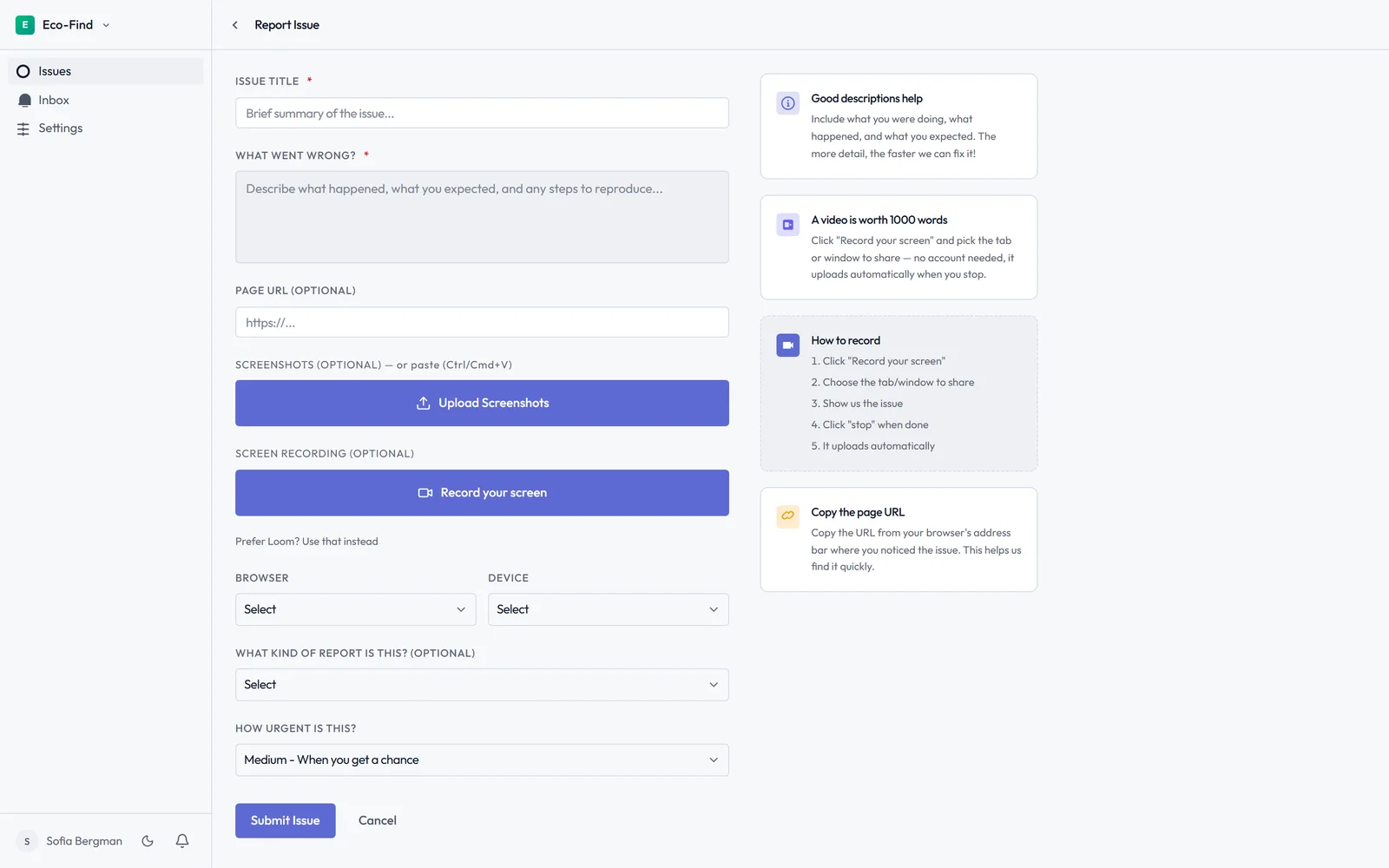
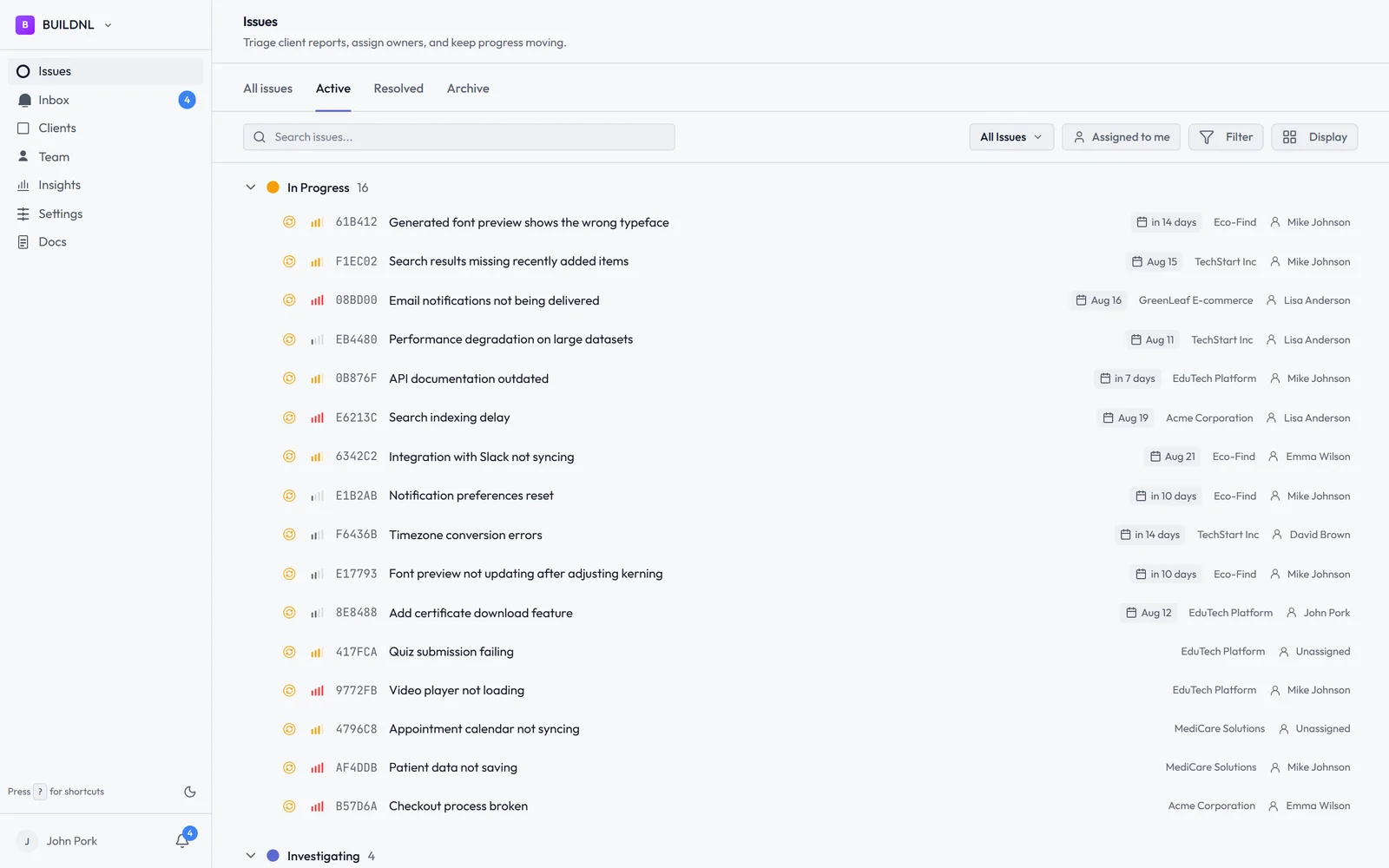
You see all clients' bugs in one dashboard, scoped by client. Clients see only their own issues, and their status without having to email you.
The Team plan is £30/month for unlimited clients. No per-user fees. No Power-Ups required.
When to Keep Trello
Trello is the right tool if you're managing internal team workflows — sprint planning, task tracking, content pipelines — where everyone on the board is a team member who already has an account. It's not the right tool when clients need to be the ones submitting and tracking bugs.
If your Trello board is something only your team sees, and bug intake comes from email or Slack, Trello can work as the internal triage layer. It's the client-facing part that breaks.
Try Lantern free for 14 days →
No credit card required on the Individual plan. The Team plan covers unlimited clients at a flat rate.
Already using Trello for internal task management and want to add client-facing bug tracking on top? Lantern integrates alongside your existing tools — bug reports flow in from clients, your team triages in Lantern, and you can push to Jira or your dev workflow from there.
Simple bug tracking for agencies. No credit card required.