Video ticket walkthroughs, built in
Stop playing telephone with clients. They record their screen right in the portal — no account needed — showing exactly what's wrong. See the issue, understand the context, resolve it in one pass.
Stop asking clients "what did you do?"
Screenshot + vague description = 5 follow-up emails. Screen recording video = see exactly what happened in 30 seconds.
- ✗"It doesn't work" with one screenshot
- ✗Back-and-forth: "What did you click?"
- ✗Missing context (browser, steps taken)
- ✗Can't reproduce the issue
- ✗45 minutes to understand one ticket
- ✓30-second screen recording shows everything
- ✓See exactly what they clicked and typed
- ✓Full context (browser visible, URL shown)
- ✓Reproduce in one attempt
- ✓5 minutes to understand and resolve
When clients can't describe technical problems
Web development agencies
Clients can't describe technical problems. "The form doesn't work" could mean anything. Screen recording shows the exact error, what they entered, what they clicked.
- →See form submissions fail
- →Watch checkout errors happen
- →Identify browser-specific issues
E-commerce maintenance
"Checkout isn't working" requires seeing the entire flow. Video walkthroughs show cart additions, payment inputs, error messages — everything needed to resolve it.
- →Full checkout flow visible
- →Payment gateway errors shown
- →Cart behavior captured
SaaS product support
Users submit tickets without technical vocabulary. Screen recordings show their workflow, reveal edge cases, and make reproduction trivial for developers.
- →User workflows visible
- →Edge cases documented
- →Instant reproduction steps
Watch it happen. Resolve it once.
Clients record 30-second walkthroughs showing exactly what's wrong — which buttons they clicked, what errors appeared, what they expected to happen. No follow-up questions needed.
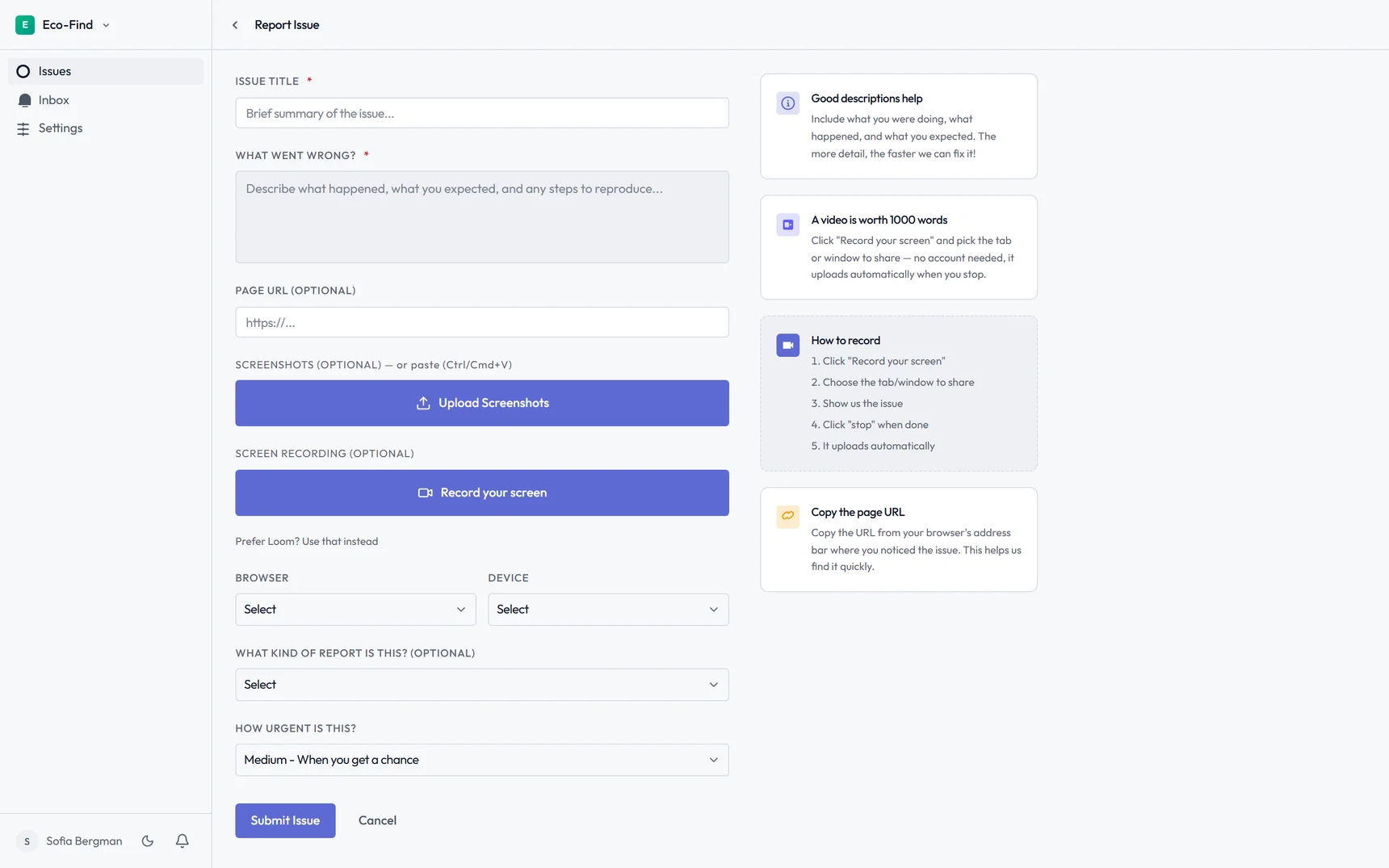
See exactly what's wrong
Clients record their screen showing the issue in action, right from the ticket form — no account, no extension to install. No more back-and-forth emails asking "what happened?" The video shows everything.
- Native screen recording, no account needed
- Prefer Loom? Paste a share link instead
- Embedded directly in the ticket
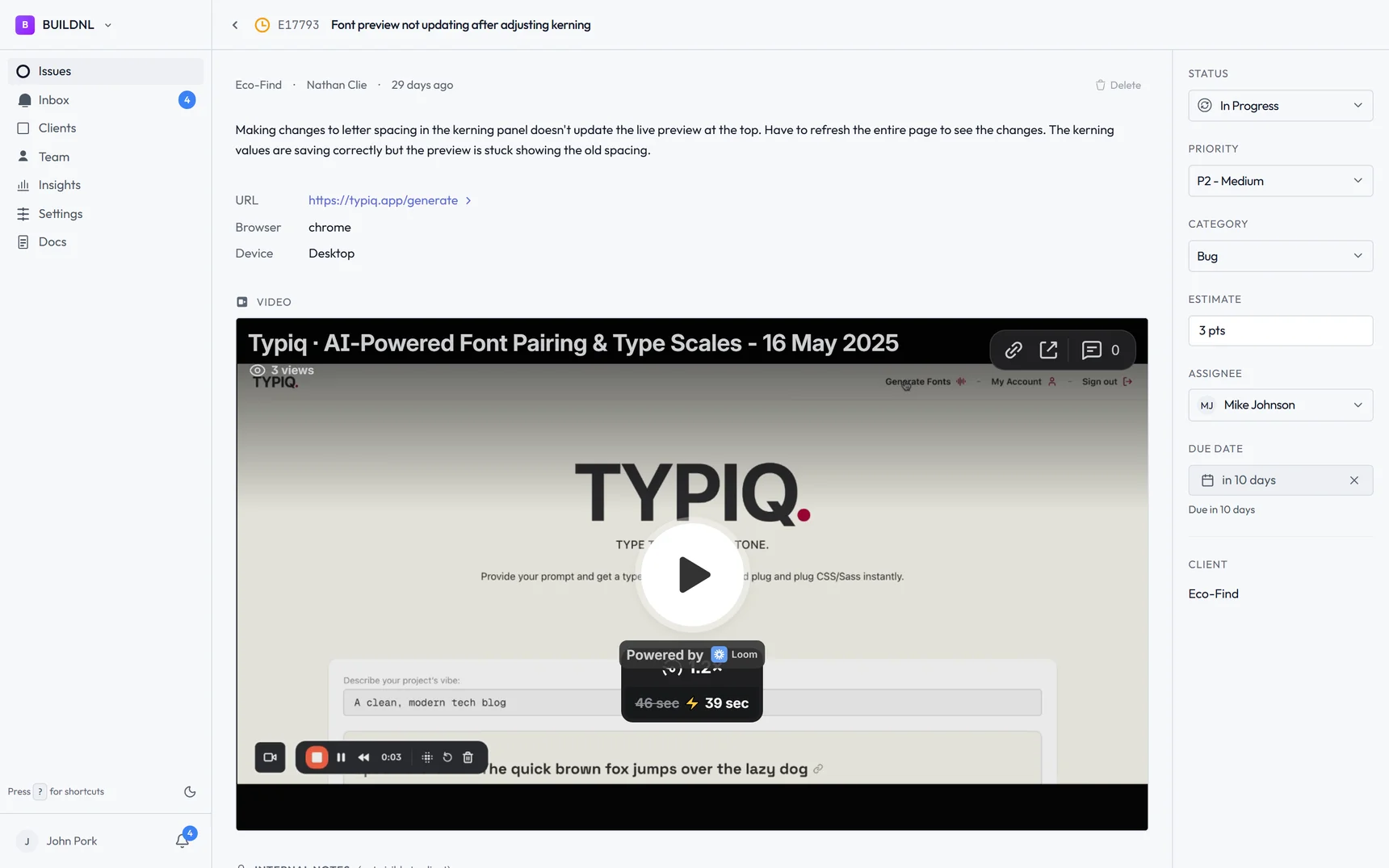
Resolve tickets in one pass
Watch the video, see the exact steps to reproduce, understand the context. No guessing, no follow-up questions. Resolve it and move on.
- Step-by-step reproduction in video
- Form prompts for browser, device, and URL details
- No back-and-forth clarification needed
Trusted by 10 agencies and freelancers who've already moved their client feedback off email and Slack.
How it works
A simple workflow that clients actually use. No complicated setup, no training required.
Client records a video
The client clicks "Record your screen" in the ticket form — no account, no extension. They show the issue happening and submit, or paste a Loom link if they'd rather use that.
Video appears in the ticket
The recording is embedded directly in the ticket. Your team watches it, sees exactly what's wrong, and resolves it.
Frequently asked questions
How do video ticket walkthroughs work?▼
Clients click "Record your screen" in their portal to capture their screen directly — no account or extension required. They show the issue happening, whatever triggers it, and it uploads automatically. The video embeds directly in the ticket. Your team watches it to understand the problem.
Do clients need an account to record a video?▼
No. Recording happens natively in the browser — the client clicks record, picks the tab or window to share, and it uploads when they stop. Zero account setup required. If they'd rather use Loom, they can paste a share link instead.
Is video better than screenshots for support tickets?▼
Much better. Screenshots show one moment — the error screen. Videos show the entire sequence: what the client clicked, what they entered in forms, what error appeared, what browser they're using (visible in the video). You see reproduction steps automatically, no follow-up emails asking "what did you do before this?"
Can clients record on mobile devices?▼
Screen recording works best on desktop browsers (Chrome, Edge). For mobile tickets, clients can still use text descriptions and screenshots. Most website issues are reported from desktop anyway, where video recording works perfectly.
Does this work for WordPress client sites?▼
Yes. Video ticket walkthroughs work for any website — WordPress, custom builds, e-commerce, web apps. Clients record their screen showing the WordPress site, you see exactly what's broken. Perfect for plugin conflicts, theme issues, or any WordPress request.
How long should ticket videos be?▼
Most effective videos are 30-60 seconds. Long enough to show the issue happening, short enough that watching doesn't take forever. Recordings automatically stop after 2 minutes to keep things focused.
Can video tickets sync to Jira?▼
Yes. When Jira integration is enabled, tickets with video walkthroughs auto-create Jira tickets. The video link is embedded in the Jira description so developers see the recording directly in their workflow.
Stop asking "what went wrong?"
Video ticket walkthroughs are included with every Lantern plan. No extra setup required.