Send client tickets directly to Jira
Clients submit tickets with an optional video walkthrough. They automatically create Jira tickets with full context. Your dev team works in Jira, clients never see it.
Not already using Jira? See why most agencies and freelancers don't need it just for client tickets →
Keep Jira for your team. Give clients something simpler.
Don't use Jira at all? Lantern is your whole system — no dev team required.
Web development agencies
Your dev team uses Jira for sprint planning. Your clients don't need to learn Jira. They submit tickets with video, issues appear in Jira automatically.
- →Client portal separate from Jira
- →Video context in Jira tickets
- →Map clients to Jira projects
Product teams with clients
Building custom software for clients? Keep Jira for internal issue tracking while giving clients a simple ticket submission portal they'll actually use.
- →Clients avoid Jira complexity
- →Issues routed to correct project
- →Clean separation: clients never see Jira
Freelancers using Jira
You use Jira to organize your work. Your clients just want to submit a request without learning project management software. Give them a simple portal instead.
- →Professional client experience
- →Automatic Jira ticket creation
- →No training clients on Jira
Push client tickets from Lantern directly to Jira
Keep using Jira for project management while Lantern handles client-facing support tickets. Every client submission automatically creates a Jira ticket with video walkthrough, technical details, and full context. No manual copying. Your dev team works in Jira as normal, clients work in Lantern.
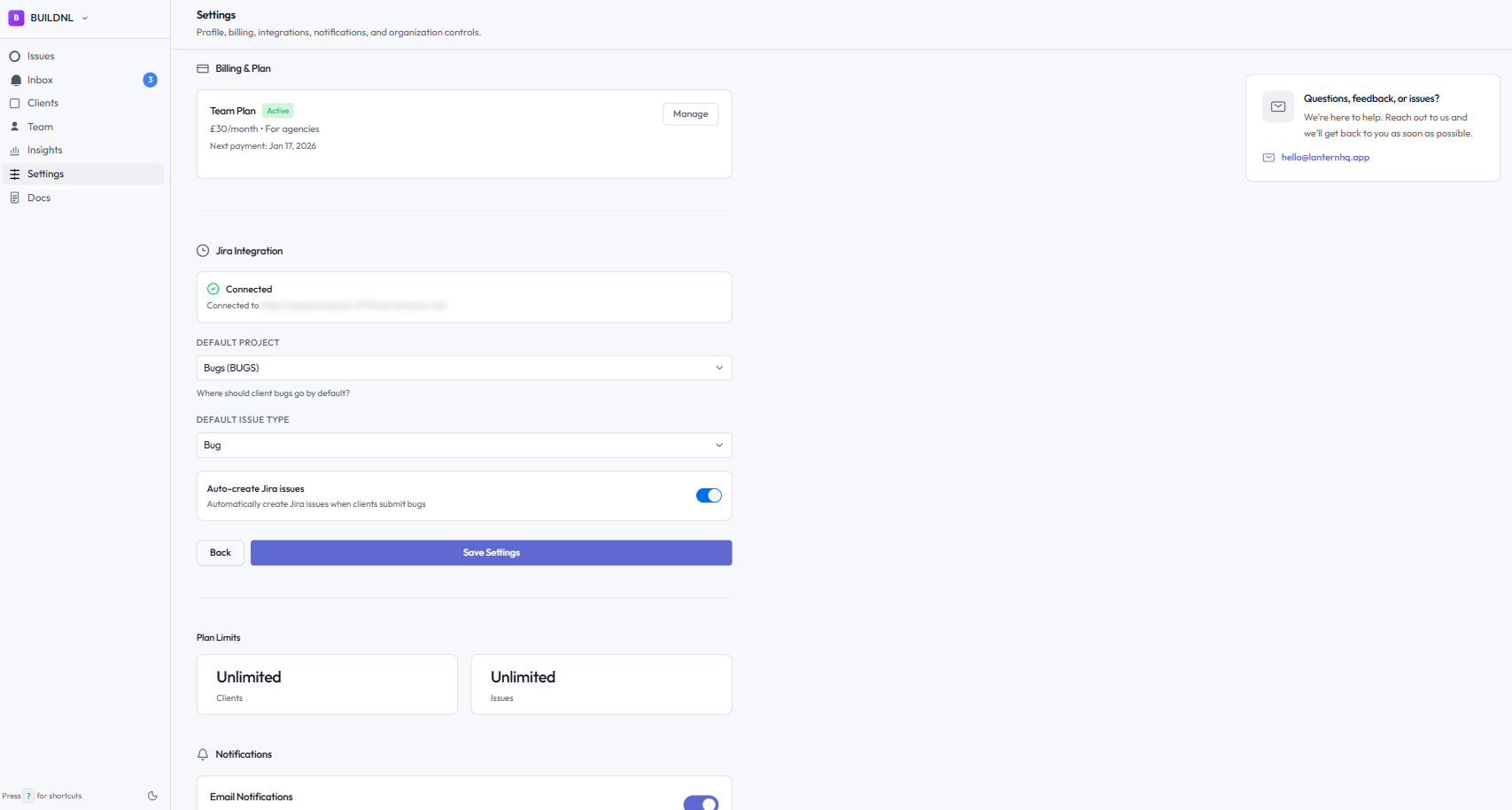
Automatic issue creation
Client tickets become Jira tickets instantly. Video walkthroughs are embedded in Jira descriptions so developers see exactly what happened. Browser info, page URLs, and client descriptions all included automatically.
- Auto-create Jira issues from client submissions
- Video links included in Jira descriptions
- Direct links between Lantern tickets and Jira tickets
- Client-specific project and issue type overrides
Trusted by 10 agencies and freelancers who've already moved their client feedback off email and Slack.
Route tickets to the right Jira project automatically
Managing multiple clients in Jira? Map each client to their own Jira project. Tickets route automatically — no manual sorting.
- ✗All tickets mixed in one Jira project
- ✗Manually copy from email to Jira
- ✗Context lost in transfer
- ✗Clients never see progress
- ✗30+ minutes per ticket
- ✓Each client maps to their Jira project
- ✓Automatic Jira ticket creation
- ✓Video + full context included
- ✓Update clients in Lantern when work is complete
- ✓2 seconds from submission to Jira
How it works
Connect your Jira instance in minutes and start sending tickets to Jira automatically.
Connect once
Enter your Jira URL, email, and API token. Choose your default project and issue type. That's it.
Auto-create enabled
Every new client ticket submission automatically creates a Jira ticket with video, description, and technical details.
Note: This is a one-way integration (Lantern → Jira). When clients submit tickets in Lantern, Jira tickets are created automatically. Your dev team works in Jira as usual. When the work is resolved, update the client-facing status in Lantern manually. This keeps your internal dev workflow separate from client-facing communication.
Frequently asked questions
How does the Jira integration work?▼
Connect your Jira Cloud instance with an API token. Choose a default project and issue type. When clients submit tickets in Lantern, Jira tickets are created automatically with video links, descriptions, and technical details embedded. Takes 5 minutes to set up.
Can I map different clients to different Jira projects?▼
Yes. Set an organization-wide default project, then override it per client. ACME Corp's tickets go to the ACME project, TechCo's tickets go to the TECH project, all automatically. Perfect for agencies managing multiple clients in separate Jira projects.
Does status sync back from Jira to Lantern?▼
No, this is a one-way integration (Lantern → Jira). When a client submits a ticket in Lantern, it automatically creates a Jira ticket. Your dev team works in Jira as usual. When the work is resolved, you update the client-facing status in Lantern manually. This keeps your internal dev workflow separate from client-facing communication.
Can clients see our Jira tickets?▼
No. Clients only see Lantern's interface. Jira tickets are created for your internal dev team only. This separation means clients don't see internal comments, time estimates, or technical details.
What information transfers to Jira?▼
Ticket title, description, video link, client name, priority level, and any custom fields you map. The video is embedded directly in the Jira description so developers can watch it without leaving Jira.
Do I need to manually create tickets in both systems?▼
No. Create once in Lantern (or client submits), and Lantern automatically creates the Jira ticket. You never duplicate work.
Can I choose which tickets go to Jira?▼
Yes. You can set rules to auto-create Jira tickets only for certain priorities, projects, or clients. Or manually trigger Jira creation for specific tickets.
Do clients need Jira accounts?▼
No. That's the whole point. Clients use Lantern's simple portal to submit tickets with video. Your dev team works in Jira. Clients never see Jira's complexity. No training, no user licenses, no confusion.
Does this work with WordPress sites?▼
Yes. Lantern works with any website — WordPress, custom builds, React apps, anything. Clients submit tickets via portal (no WordPress plugin required). Tickets automatically create Jira issues regardless of your tech stack.
What Jira versions are supported?▼
Currently Jira Cloud only (e.g., yourcompany.atlassian.net). Jira Server and Data Center support planned for Q2 2026. If you need Server/DC support sooner, contact hello@lanternhq.app.
Is this better than using Jira alone for client tickets?▼
Much better. Jira is built for development teams, not client communication. Clients find it overwhelming and confusing. Lantern gives clients a simple portal while keeping your team in Jira. Video ticket walkthroughs automatically create Jira tickets — best of both worlds.
Start sending client tickets to Jira automatically
Jira integration is available on all Lantern plans. Connect your instance and start forwarding client tickets to your dev team in minutes.