Basecamp has something most agency tools don't: clients actually use it.
That's not a small thing. Getting clients to consistently use any tool — rather than defaulting to email — is one of the hardest problems in agency operations. Basecamp solved it by making the client experience simple, familiar, and not at all technical. Message boards, to-do lists, file storage, a group chat. Clients can navigate this without training.
So it seems natural to route bug reports through Basecamp. Clients are already in there. Why not add a "Bugs" message category or a to-do list per site and call it solved?
The reason is that client collaboration and bug tracking are different jobs. Basecamp does the first one well. Bug tracking requires structure that Basecamp deliberately doesn't impose.
The Basecamp Bug Tracking Setup
Most agencies using Basecamp for bugs land on one of two approaches:
The message board approach: Create a "Bugs" category. Clients post a message when they find something wrong. Your team replies with updates.
The to-do list approach: Create a to-do list called "Bugs" per project. Clients (or your team) add to-do items for each bug.
Both can work as a rough intake system. Both start showing cracks within a few months.
Where Basecamp Falls Short for Bug Tracking
Messages and to-dos have no structure
A Basecamp message can say anything. "The website looks weird" is a valid message. So is "Something's off on the new page." Your team receives it, asks for more detail, and the clarification thread begins.
There are no required fields. No browser field, no URL field, no steps-to-reproduce field. Clients report what they think to report, which is rarely what developers need. Bug tracking requires enforced structure. Basecamp's open-ended model is its strength for general communication and its weakness for bug intake.
No automatic context capture
When a client submits a bug, you'd ideally know: which browser they were using, what device, which exact URL, what they did before the bug appeared. Basecamp captures none of this. Clients have to know to include it, remember to include it, and find the right way to describe it. Most don't.
Compare that to a purpose-built tool where the browser, OS, URL, and screen size are captured the moment a report is submitted — without the client doing anything extra.
No video bug reports
Basecamp supports file attachments. A client could attach a screenshot. But there's no built-in recording mechanism, no Loom integration, no way to prompt clients to show you the bug rather than describe it.
The gap between "show me a 30-second video of what's happening" and "type a description of what's happening" is enormous in practice. Video removes ambiguity. Text descriptions of interactive bugs almost always leave questions.
Bugs get buried in the project stream
In a busy Basecamp project, bug reports compete with design feedback, meeting notes, invoice conversations, and general client messages. Unless you're disciplined about categorisation, a bug reported on a Thursday can be 30 messages deep in the activity feed by Monday. There's no dedicated bug triage view, no way to see all open bugs sorted by priority, no aging report showing what's been open for three weeks.
No per-bug status tracking
To-do items in Basecamp are either done or not done. There's no "in progress," no "needs more info," no "fixed — please verify." You can use comments to communicate status updates, but clients have to check Basecamp actively to see them. Most won't — they'll email asking if anyone's looked at their bug yet.
Clients are in Basecamp, but bugs still blur together
The best thing about Basecamp is that clients actually use it. The worst thing about using it for bugs is that bug reports share space with everything else. A client managing a site redesign project in Basecamp will mix bug reports with content feedback with billing questions. Separating them out — and making sure your team has a clean view of just the bugs — requires a discipline that the tool doesn't enforce.
What Bug Tracking Actually Needs
The difference between Basecamp and a purpose-built bug tracker comes down to a few structural features:
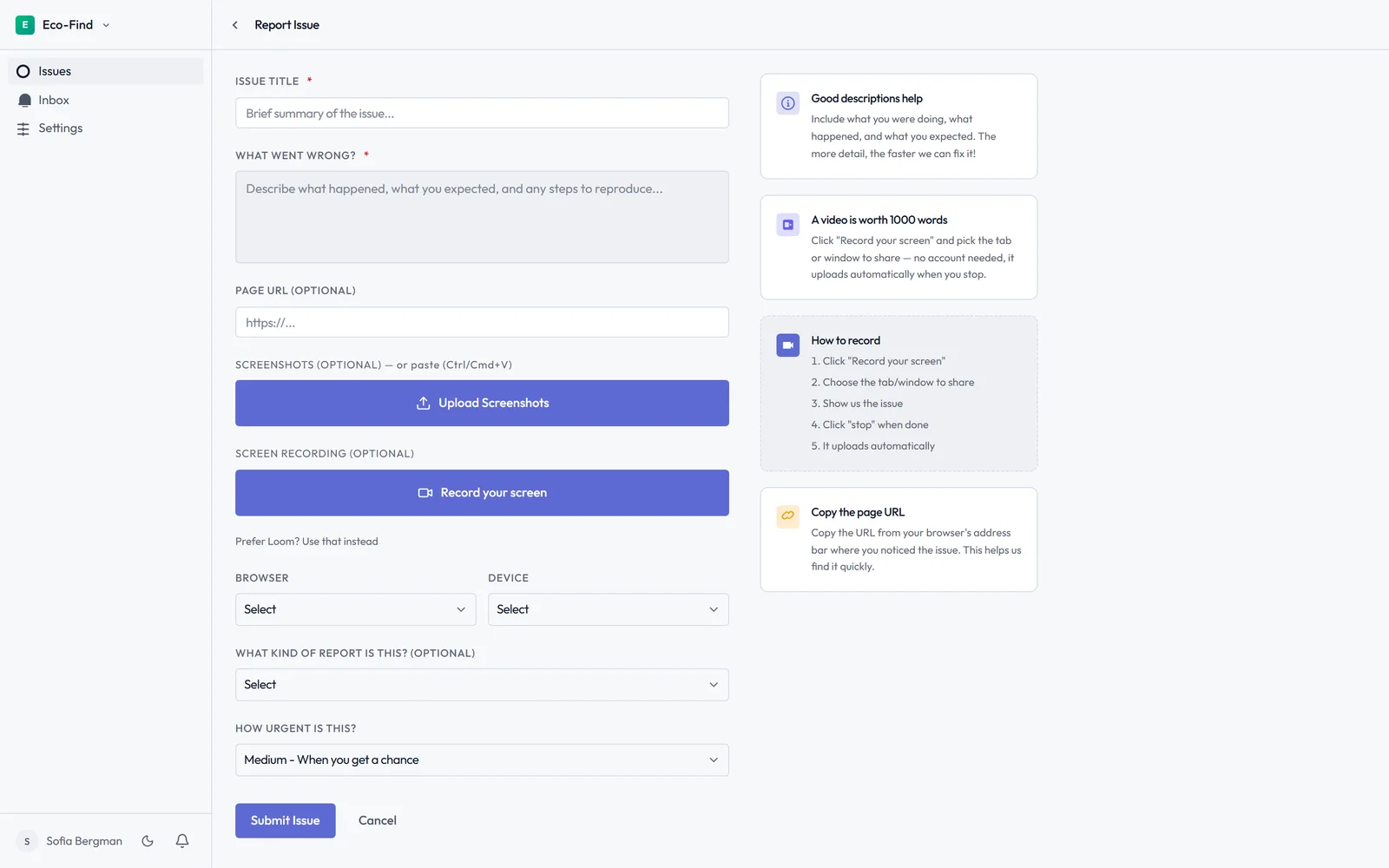
- Required fields that capture browser, URL, device, and steps before a report is submitted
- Bug-specific statuses — confirmed, in progress, fixed, closed — not just done/not done
- Video that lets clients show the bug rather than describe it
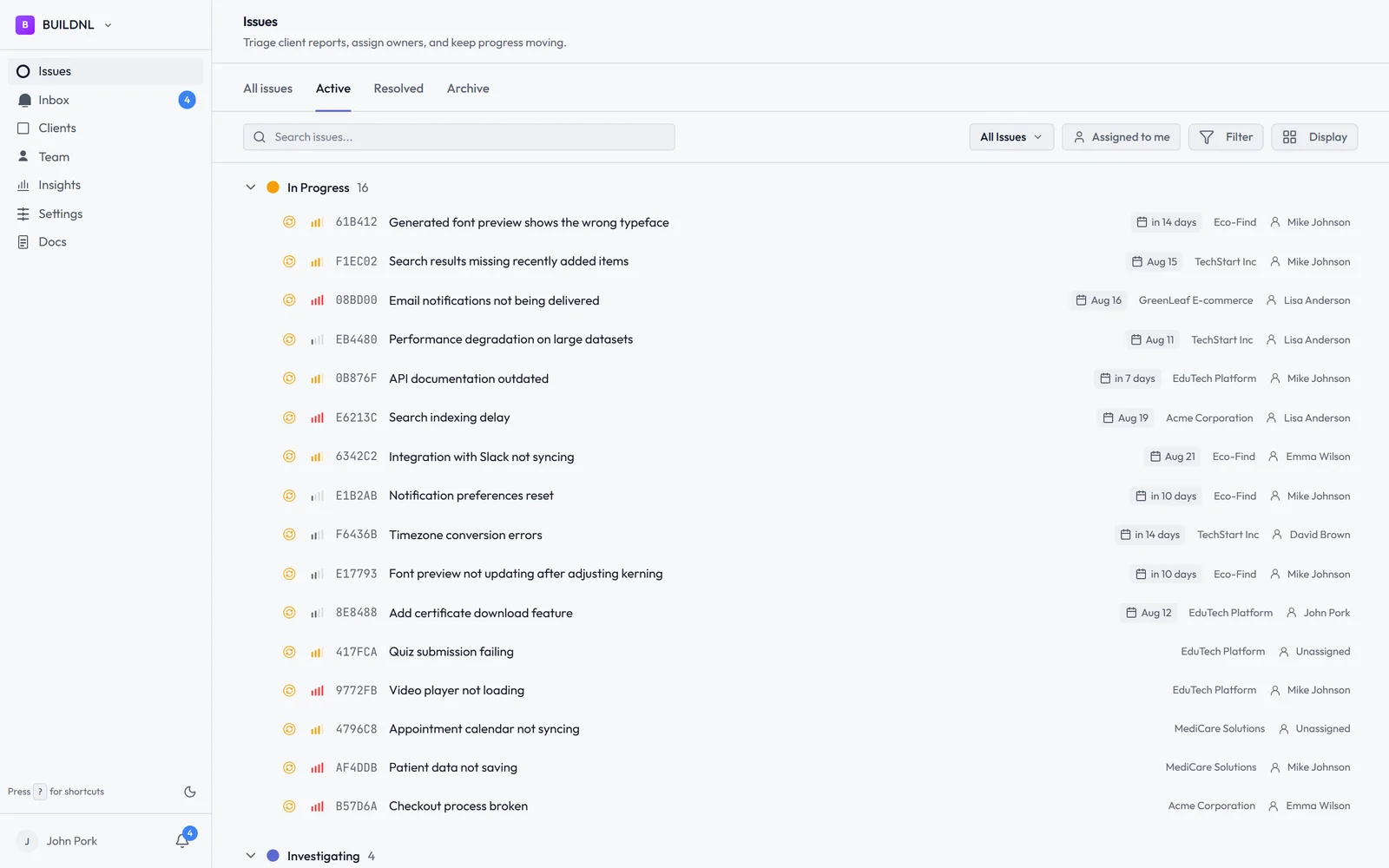
- Dedicated triage view where all open bugs across all clients are visible in one place, sortable by priority and age
- Client status visibility that doesn't require clients to check Basecamp actively
These aren't nice-to-haves. They're the features that determine whether a bug gets fixed in one pass or takes a week of back-and-forth.
How Lantern Compares
| Feature | Basecamp | Lantern |
|---|---|---|
| Clients actually use it | ✅ Yes | ✅ Yes (widget in their CMS) |
| Structured bug submission | ❌ No required fields | ✅ Yes |
| Auto-captures browser/OS/URL | ❌ No | ✅ Yes |
| Video bug reports | ❌ No | ✅ Yes (Loom integration) |
| Bug-specific statuses | ❌ No | ✅ Yes |
| Dedicated triage dashboard | ❌ No | ✅ Yes |
| Per-client scoping | ⚠️ Separate projects | ✅ Built in |
| Flat pricing for unlimited clients | ❌ Per user | ✅ Yes (£30/month) |
Lantern solves the same problem Basecamp solves — getting clients to actually submit bug reports — but with the structure that bug triage requires.
Clients get an invite link to their own portal — a quick, secure login, not a public signup form. The bug report button embeds inside their WordPress admin or Umbraco backoffice, visible only when they're logged in. They record a 30-second Loom video showing the problem. Browser, OS, URL, and screen size are captured automatically.
Your team sees all bugs across all clients in one triage dashboard. Clients see the status of their reports without emailing you. Bugs that need to move into a dev workflow push to Jira automatically.
The Team plan is £30/month flat for unlimited clients. No per-seat fees for client contacts.
The Honest Summary
Basecamp is the right tool for client communication: sharing documents, discussing feedback, coordinating project milestones. It's genuinely good at making clients feel included without overwhelming them.
It's not the right tool for bug tracking, because bug tracking requires a structure Basecamp deliberately doesn't impose. Clients reporting bugs in Basecamp is like clients reporting bugs by email — friendly and accessible, but structurally incomplete.
Try Lantern free for 14 days →
No credit card required on the Individual plan.
Using Basecamp for general client communication and looking for something purpose-built for bug reports? The two tools work well in parallel — clients use Basecamp for project conversations and Lantern for bug submission, with no overlap or confusion.
Simple bug tracking for agencies. No credit card required.