Your WordPress clients are not tech-averse. They log into their admin every week to publish posts, update pages, check WooCommerce orders. They know their way around the dashboard.
And yet when they find a bug, they email you. "Hey, something looks off on the site — can you take a look?" No browser. No device. No URL. No screenshot. Just a sentence that starts a thread that costs you an hour before you've touched any code.
It doesn't have to work that way.
The WordPress-specific version of this problem
The frustrating thing about this isn't that your clients are technically incapable of giving you useful information. It's that there's no prompt. They spot the bug, they switch to email, and by the time they're typing, they've already mentally moved on. The detail is gone.
Ask any freelance WordPress developer what their most common bug report looks like and the answer is always some version of: "The site is broken." Sometimes there's a page name. Rarely a browser. Never a device. Almost never what they were actually trying to do when it happened.
So you reply asking for more information. They answer the next day. You ask a follow-up. By Thursday you understand the bug. You fix it in 20 minutes, but the week has a hole in it that didn't need to be there.
This is an infrastructure problem, not a client management problem. The reporting mechanism is wrong.
WordPress makes it fixable
Here's what's different about WordPress clients versus other clients: they're already inside a structured admin environment every time they're working on their site. They know where the sidebar is, they know how to navigate, they know what the toolbar looks like.
If the bug report button is right there when they're logged in — not a link you shared three months ago, not a separate tab they have to remember to open — they use it. Because the friction is gone.
That's exactly what the Lantern WordPress plugin does.
How it works
Step 1: Install the plugin
Search "Lantern" in wp-admin → Plugins → Add New, or install directly from the WordPress plugin directory. Activate it. That's the entire installation — no theme editing, no code, no FTP.
Step 2: Paste the embed key
In your Lantern dashboard, open your client's project and copy their embed key. Paste it into the Lantern plugin settings. Each client gets their own key, so every issue that comes in is automatically scoped to the right project.
Step 3: The floating button is live
A floating bug report button appears in the corner of the site. Your client sees it as soon as they log in. It's there every time they're browsing their own site while authenticated. When they spot something wrong, the button is right there — no link to remember, no new tab to open.
What clients see vs what visitors see
This is the part that matters if you're putting this on a live client site.
The widget checks for the WordPress admin bar — the black toolbar WordPress injects at the top of the page for every authenticated user. If the admin bar is present, the button appears. If it's not — for any visitor, customer, or search engine crawler who isn't logged in — nothing renders. Not a hidden button. Not an invisible element. Nothing.
You can install it on a live WooCommerce site and leave it running. Customers browsing the shop never see it. Your client browsing while logged in sees it immediately.
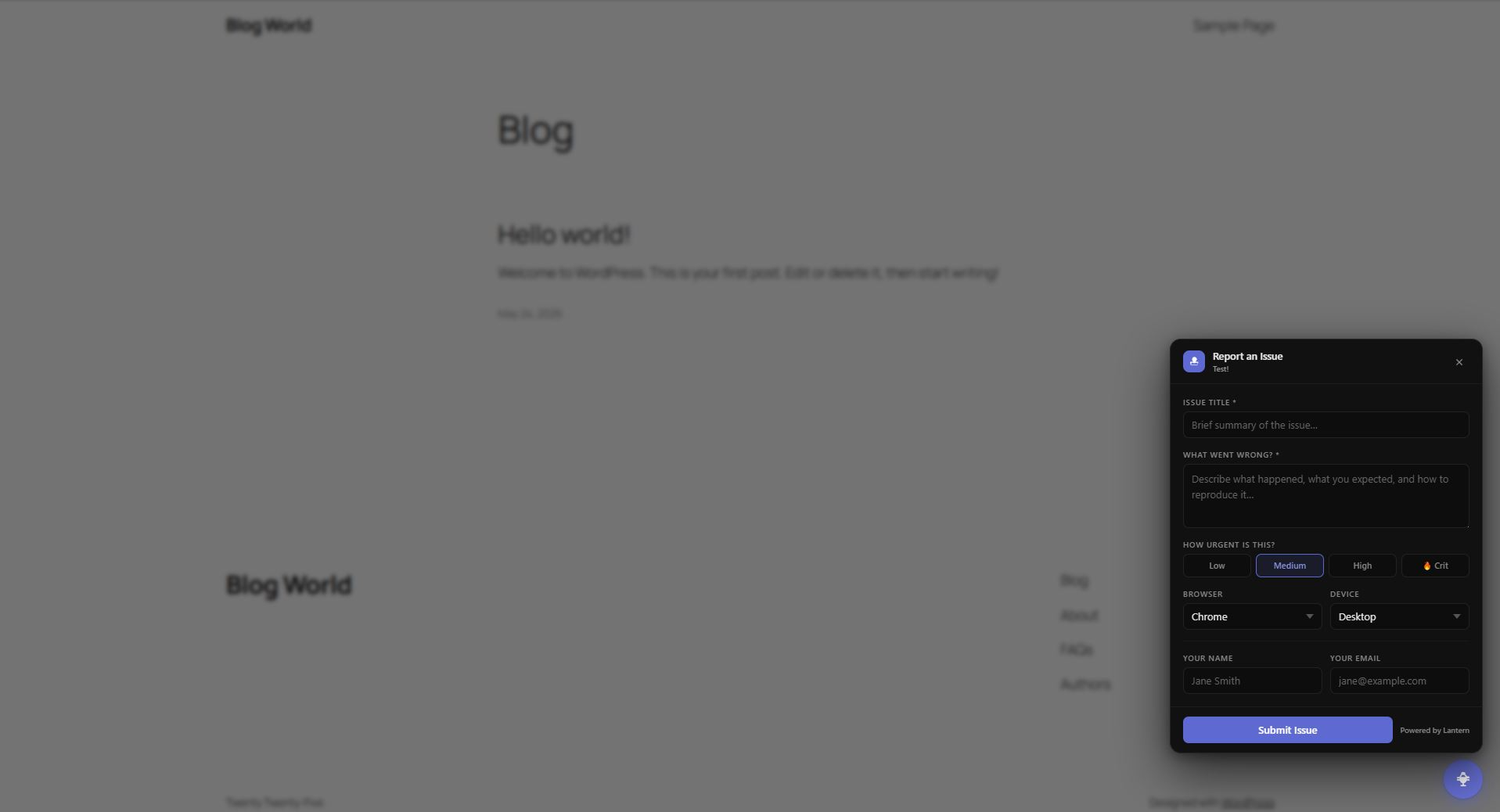
What lands in your dashboard
When a client submits a report, here's what you receive in Lantern:
- The page URL where they reported the issue
- Their title and description
- Urgency level (they set it; you see it immediately)
- Browser and operating system, auto-detected
- Device type, auto-detected
- Optional Loom video walkthrough if they recorded one
No follow-up questions needed. You have the URL, the environment, the context. You can reproduce it and fix it in the same session.
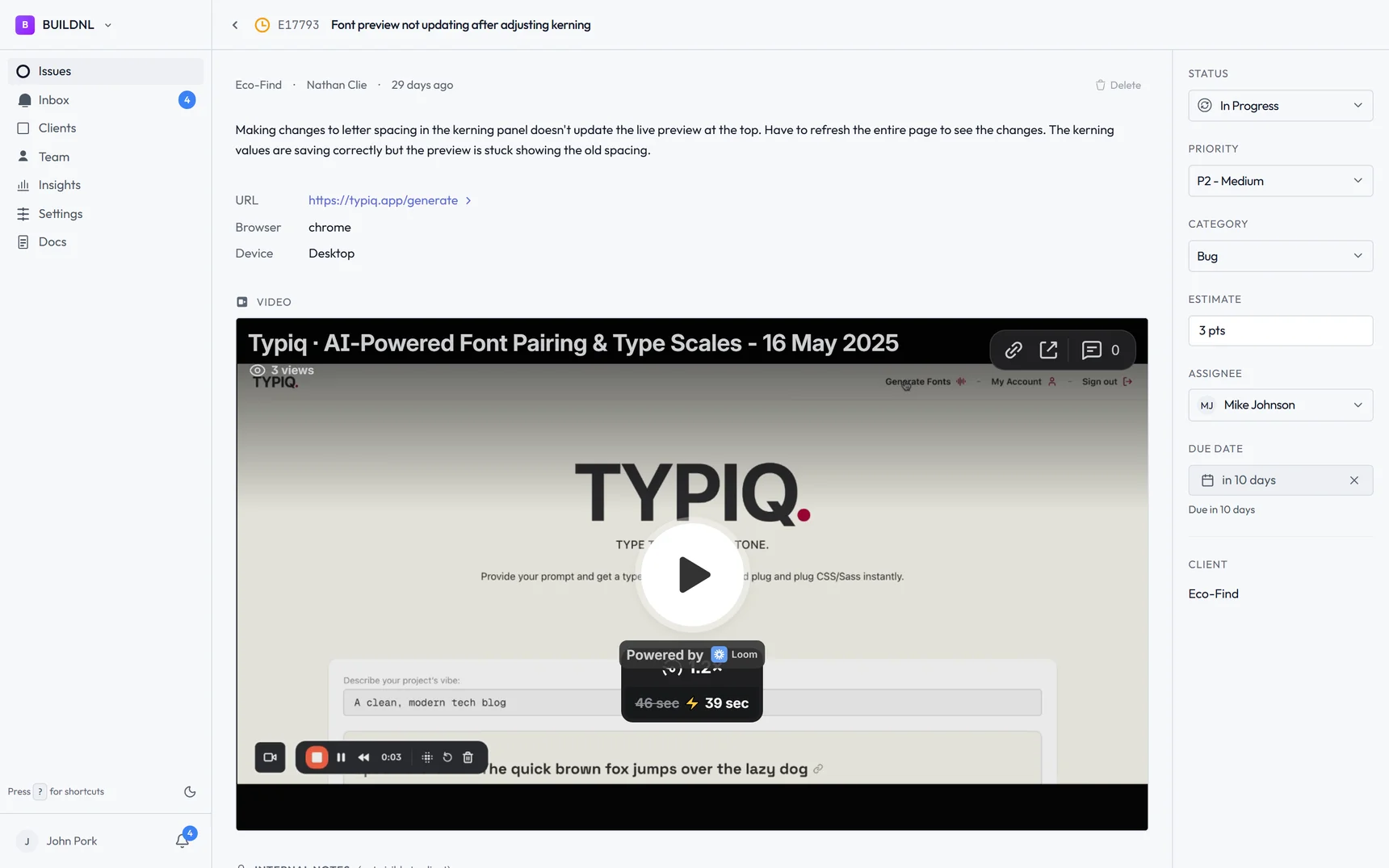
All your clients' issues sit in a single dashboard. You can see what's open across all your sites, filter by urgency, update statuses, add notes. When you mark something as fixed, your client can see it in their portal — they don't need to email asking for an update.
The pricing
The Individual plan is £12.50/month (€15 / $17). It covers up to 5 clients and unlimited issues. There's a 14-day free trial and no credit card required to start.
If you're managing more than 5 clients, the Team plan is £30/month for unlimited clients — same flat rate whether you have 6 clients or 20.
At any freelance rate, the time you'll save on the first clarification thread more than covers the monthly cost.
Install the plugin and start your free trial →
Setup takes under five minutes. Your clients don't need a Lantern account — they just need to be logged into WordPress.
Simple bug tracking for agencies. No credit card required.