If you manage WordPress sites for clients, you already know the pain. Client sends a vague email — "the form's broken" or "something looks off on mobile" — and you spend the next 20 minutes just trying to figure out what they're actually talking about.
What you need is a proper WordPress bug tracker: something that sits on the client's site, lets them report issues with context, and keeps everything in one place. Here's how to set it up properly.
Why agencies need a real WordPress bug tracking system
Email is the world's most popular accidental bug tracker. It works fine when you have one client. It falls apart when you have ten.
The core problems with email bug reports on WordPress sites:
No context. Client types "the homepage looks broken" and hits send. Which element? Which browser? Which screen size? You don't know, so you send a follow-up. They reply two days later. The actual fix takes 10 minutes — the back-and-forth takes two days.
No history. Three months later the same issue comes back. You have no record of what caused it or how you fixed it last time. You start from scratch.
Nothing organised by client. Fifteen client sites, fifteen email threads, no clean way to see what's open, what's fixed, and what's being ignored.
A dedicated WordPress issue tracker solves all of this. Bugs come in with context attached. Everything is organised by client. Status is tracked automatically. You stop spending half your time managing email and start spending it fixing things.
Setting up Lantern on a WordPress site
Lantern is a bug tracking tool built specifically for agencies managing client WordPress sites. Each client gets their own space. When they spot an issue on their site, they report it directly to you — no email chains, no vague descriptions.
Setup takes about five minutes per site, and it's just one script tag. No plugin to install, no WordPress admin settings to configure.
Step 1: Copy the embed key
Log into your Lantern dashboard and go to Clients → [Client Name]. On the client page, scroll down to the Embed Widget section — you'll see their embed key, a unique token that links submissions from their site to their Lantern project.
Hit Copy next to the key. That's it for this step.
Step 2: Paste the script tag into the WordPress theme
In the WordPress admin, go to Appearance → Theme File Editor (or use a child theme, or a header/footer plugin if you prefer to avoid editing theme files directly).
Find the footer.php file and paste this script tag just before the closing </body> tag, replacing YOUR_KEY_HERE with the embed key you copied:
<script src="https://lanternhq.app/api/widget/script" data-key="YOUR_KEY_HERE" defer></script>
Save the file. That's the entire setup.
Step 3: Confirm it's working
Reload the WordPress site while logged in as an admin. You should see a small floating button appear on the page — usually in the bottom corner. Click it to open the bug report form.
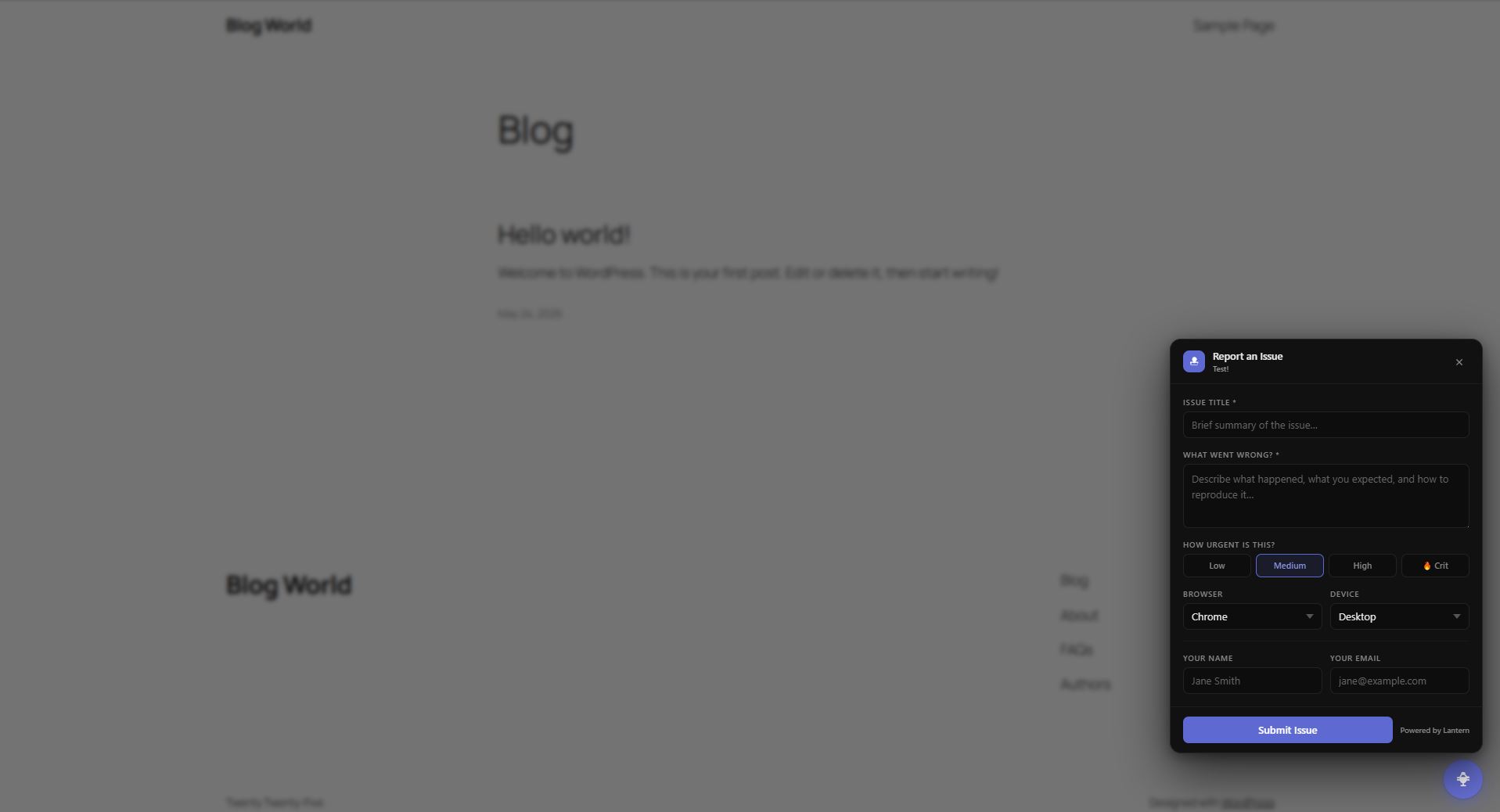
Submit a test report. Check your Lantern dashboard — it should appear instantly in that client's project.
What the widget actually does
The floating button is only visible to logged-in WordPress administrators. Regular visitors, customers, and anyone who isn't authenticated as a WordPress admin will never see it. You don't have to worry about it cluttering the site for the client's users.
When an admin clicks the button, a small form opens. They can describe the issue, and the submission goes straight into Lantern — tagged to that client, timestamped, and waiting in your dashboard.
From there you can:
- See all open issues for that client in one view
- Add internal notes, update status, and assign issues
- Keep the client in the loop without email back-and-forth
Every client site you manage gets its own project in Lantern. So instead of wading through a mixed inbox, you have clean, per-client issue queues.
Why this beats the alternatives for WordPress agencies
The usual alternatives for WordPress bug tracking all have real problems:
Email — already covered. Doesn't scale, loses context, creates chaos.
Shared Trello or Notion boards — clients rarely use them consistently. The friction of logging into a separate tool means most issues still come in by email anyway.
Generic help desk tools — built for support tickets, not for catching and fixing WordPress-specific issues. Too much overhead for a 10-minute CSS fix.
The script tag approach gives you a bug reporting layer that lives on the WordPress site itself. The client doesn't need a login to a separate tool. They don't need to describe which site they're on — the widget already knows. The report lands in the right place automatically.
A few tips once you're set up
Add it to every new client site on day one. It's five minutes per site. Don't wait until the client starts emailing bug reports — get it in place before launch.
Use it yourself during QA. When you're doing a round of testing before handoff, use the widget to log issues as you find them. Everything goes into the same queue, nothing gets lost in a text file.
Show clients how to use it. A 60-second screen recording goes a long way. "When you spot something off on the site, click this button, describe what you're seeing, hit submit — and it comes straight to me." That's the entire training.
Proper WordPress bug tracking doesn't have to be complicated. One script tag, an embed key, and every issue goes exactly where it should — organised by client, tracked from report to fix, out of your inbox for good.
Try Lantern free for 14 days and get the widget running on your first client site today.
Simple bug tracking for agencies. No credit card required.